
Do you need a kitchen display or printed tickets on Shopify POS?
Updated · 7 min read
By Invenire Studios, makers of Countermade
The short answer
A kitchen display pays off when several stations share many open orders that change after sending. If one person makes each order, or orders are for later, one printed ticket is enough. Shopify POS has no built-in kitchen screen; POS Pro locations can print an extra receipt copy. Apps add a screen: as of October 2026, Simmer costs US$30.00 a month per location, and POS Cafe with one Fresh KDS screen US$49.00 (monthly billing).
When does a kitchen display (KDS) pay for itself?
A kitchen display pays for itself when the hard part of the job is keeping track of orders. If several people work on different parts of many open orders, and those orders change after they reach the back, a screen keeps every station working from the same list and shows which order has waited longest.
- Each station needs only its own items. Square’s KDS page lists sending orders “to the right prep stations” as a feature. Café apps such as POS Cafe also send each prep area its own tickets, on a printer or a screen. POS Cafe’s own docs give the mixed case: “the kitchen works from a screen while the barista keeps a printed docket.”
- Many orders are open at once and need sorting. Screens add ticket timers and alerts, and Fresh KDS lets staff rearrange, hold and recall orders.
- Orders change after they’re sent. On paper, every change means a new ticket, and someone has to find and throw out the old one.
- You want to measure prep time. Square includes prep-time reports, and Fresh KDS speed-of-service reports.
Take, for example, a café with a hot food counter and a barista, both working from the same stream of orders through a lunch rush: with a screen at both, every station sees only its own items, in order.
When is one printed ticket per order enough?
Paper is enough when the person who reads the ticket makes the whole order. If orders are made later rather than in the next few minutes, and the ticket can travel with the job, a screen adds a monthly fee without solving a problem your counter has.
- One person or one bench makes the whole order, so there’s nothing to split between stations.
- Orders are for later: tomorrow’s birthday cake, Saturday’s wedding flowers, an engraving due next week.
- The ticket goes with the work, taped to the cake box, clipped to the bucket or pinned to the frame.
- Nobody needs to see which order has waited four minutes.
A bakery taking a handful of custom cake orders a day, for example, needs each order written down clearly once, with the customer and the notes. The same goes for a florist’s workroom, a deli’s catering and platter orders or a shop that engraves or frames to order. If you’re new to the term, here’s what a prep ticket is.
What can Shopify POS print for the kitchen without an app?
It can print the customer’s receipt, in two ways. At a POS Pro location you can print extra receipt copies after each sale. Before payment, you can check out with Mark unpaid and reprint that order’s receipt for the back. Either way, what comes out is a receipt written for the customer, not a kitchen ticket.
After the sale: print a second copy. Shopify’s printing options set this up:
- From Shopify POS, tap the Horizontal menu icon, then tap Settings.
- In the Orders section, tap Printed receipts.
- Turn on Automatically print receipts, which prints through the connected default printer.
- Set Number of receipts printed to 2, so a second copy prints after every sale for you to take to the back.
Before payment: Mark unpaid, then reprint. Check out with Mark unpaid, which processes the order as a zero-amount payment, then reprint its receipt from the order. The steps are in printing an order before the customer pays.
Skip the gift receipt. Since August 11, 2026, gift receipts in Shopify’s new receipt template no longer list line items, so they can’t serve as an item list. See what a gift receipt shows now.
Shopify supports Star Micronics and Epson receipt printers; see which printers work with Shopify POS.
How do a kitchen display and a printed ticket compare at a small counter?
A kitchen display is a live, shared view of every open order, split by station. A printed ticket is one fixed record of one order that goes wherever the work goes. For one bench making orders for later, paper does the job; for several stations working live orders, a screen does.
| Compared | Kitchen display | Printed ticket |
|---|---|---|
| What staff see | Every open order, sorted, with timers and alerts | One order on one piece of paper |
| What’s on the paper | None by default (Fresh KDS Premium adds ticket printing) | Natively, the customer’s receipt; with a prep ticket app, items, quantities, customer and notes, no prices |
| More than one station | Orders go to the right prep station | Print a copy for each, or use a café app such as POS Cafe that sends each prep area its own printed ticket |
| Prep-time or speed-of-service reports | Included (Square, Fresh KDS Essentials) | None |
| Hardware | A tablet for each screen (Fresh runs on iPads, Android tablets and touch screen monitors; Square KDS on Android) | A supported Star Micronics or Epson receipt printer for Shopify’s own receipts; ticket apps vary |
| Monthly cost | Per screen or per location (next section) | Native receipt copies: no app fee, but they need POS Pro. Ticket apps charge their own fee. Plus paper and a printer. |
What does a kitchen display cost with Shopify POS?
As of October 2026, Simmer is the lower-priced of the two Shopify routes compared here, at US$30.00 a month per location. With Shopify POS, Fresh KDS connects through POS Cafe, so that route pays both apps: US$49.00 a month for one screen on monthly billing. Each Fresh KDS screen also needs a tablet or touch screen monitor.
| Option | Entry price, as of October 2026 | What you also need |
|---|---|---|
| POS Cafe with Fresh KDS | POS Cafe from US$29.00 a month (one location), plus Fresh KDS from US$20.00 per screen a month on monthly billing (US$16.00 billed yearly) | A tablet or touch screen monitor per screen |
| Simmer | US$30.00 a month per location | A kitchen display or an Epson or Star Micronics ticket printer |
| Square KDS (not Shopify) | US$20.00 per device a month with Square Premium, US$30.00 with Square Plus | A Square Plus or Premium subscription and an Android device |
Prices as of October 2026; POS Cafe, Simmer and Prep Ticket compared is kept current.
For example, two Fresh KDS Essentials screens and POS Cafe’s Essential plan come to US$69.00 a month on monthly billing (2 × US$20.00 + US$29.00), before the tablets. POS Cafe offers a 21-day free trial, Simmer 30 days, and Fresh KDS seven days of Premium.
That comparison also covers setup and how each app handles drafts. If you’re weighing a move from Square, see Shopify POS vs Square for bakery tickets.
Can I print a ticket for an order taken days ahead in Shopify POS?
Not natively while it’s a saved draft. Shopify’s help says “Draft orders must be completed and converted to regular orders before they can be printed.” From POS, the native route to paper is to complete the order early with Mark unpaid; from the admin (Orders > Drafts) you can only browser-print the draft page, prices and all.
Shopify’s order printing starts once there’s an order. For example, a bouquet ordered on Tuesday for Saturday can sit as a draft until the customer collects and pays. Every workaround is in every way to print a draft from POS.
How do I print a ticket without prices from a draft order in Shopify POS?
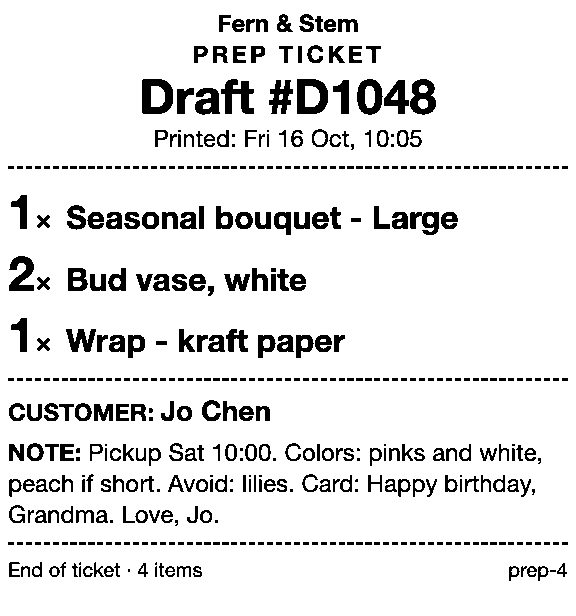
Use Prep Ticket, from Countermade (the Shopify POS apps from Invenire Studios). From a draft order in Shopify POS, it prints a prep ticket with item names, quantities, customer and notes, and no prices, so it can go to the back without showing what the customer paid. It works with drafts made in POS or the Shopify admin.
It prints through the iPad’s print dialog to a printer the iPad can reach (AirPrint), and needs Shopify POS Pro. For the Tuesday bouquet, print the ticket when you save the draft, clip it to the bucket, and it’s there on Saturday.
Decide by counting orders and stations
Count how many orders are open at your busiest hour, and how many places make them. If it’s many orders across several stations, compare the screen options above. If it’s a few orders made by one bench, often for later, save each as a draft and print its ticket with Prep Ticket.
Prep Ticket isn’t on the Shopify App Store yet. Join early access and we’ll email you when it’s ready to try.
Get early access to Prep Ticket
Thanks. You’re on the list, and we’ll email you when Prep Ticket is ready to try.
Common questions
Do I need a KDS for a small counter?
Does Shopify POS have a kitchen display system?
How much does a kitchen display cost per month on Shopify POS?
Can I print a second receipt for the kitchen in Shopify POS?
Can I print a kitchen ticket before the customer pays in Shopify POS?
Read next
About Prep Ticket- Guide How to print a Shopify draft order from POS Shopify has no Print button for drafts. Every workaround, and what each one prints.
- Guide Shopify POS: how to print an order before the customer pays Create the order now with Mark unpaid, or keep it as a draft and print that instead.
- Guide Which printers can print prep tickets from Shopify POS? Which Star and Epson printers Shopify supports, and how POS apps print to them.
- Guide Recent cart or draft order: which to use in Shopify POS Recent carts delete after 24 hours by default. Drafts last a year unedited and can hold stock.
- Guide Shopify POS receipt code editor ends January 1, 2027: what to do The code editor ends January 1, 2027. What to check, rebuild and preview before you switch.
- Guide How to create a pickup order in Shopify POS Create a Shopify POS pickup order, mark it ready, notify the customer, and print a slip