
How to take catering and platter orders in Shopify POS
Updated · 5 min read
By Invenire Studios, makers of Countermade
The short answer
Build each catering order in the Shopify POS cart, put the event date, pickup time and any allergies first in the order note, and save it as a draft order, a POS Pro feature. Shopify won’t print a draft, so make it an order first and print it with Order Printer, or print a price-free prep ticket from the draft with Prep Ticket, from Countermade. Get paid ahead by checkout link or deposit.
How do I take a platter or grazing board order by phone or at the counter in Shopify POS?
Save a phone or counter platter order as a draft order in Shopify POS. Add the customer to the cart before you save, so their name and contact details are on the draft. Read the allergy line in the note back to the customer, because the kitchen works from it.
- Add the platters, then the customer.
- Tap ⋯ (More actions) > Add note, type the note and tap Save.
- Tap ⋯ > Create draft order.
Save it as a draft rather than a recent cart, because by default a recent cart deletes after 24 hours (recent carts vs draft orders).
Where do I put the pickup time and allergies on a Shopify draft order?
Put the event date, pickup time and allergies in the draft order’s note, in a fixed sequence: the date and pickup time, then allergies and dietary needs in capitals, then the head count, with a slash between each part. A draft order has no field for the event date or pickup time. Merchants have asked for one.
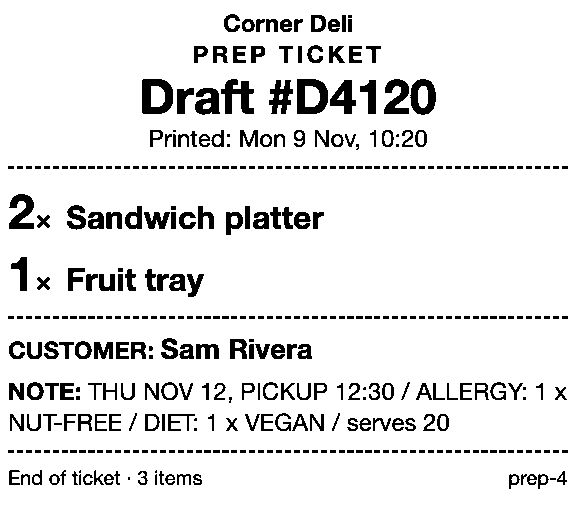
For example: THU NOV 12, PICKUP 12:30 / ALLERGY: 1 x NUT-FREE / DIET: 1 x VEGAN / serves 20.
What if a catering order comes in by email?
Key an emailed catering order as a draft in the Shopify admin: Orders > Drafts > Create order, with the same note. In POS, you’ll find it on the drafts list under the Sale type: Admin filter (every draft order action).
If you added a delivery fee in the admin as a custom shipping rate, loading the draft in POS removes it, so add it again before you take payment.
How do I change a catering draft order in Shopify POS when the head count changes?
Keep it as a draft and update it as the numbers change: tap ⋯ > Load draft order > Load to cart, change the quantities or the note, then tap Update draft order. Take money only once the count is final, because Shopify takes no further payments on a part-paid order after it’s edited.
Reserve limited stock on the draft (Reserve inventory in the admin, with an expiry; needs inventory tracking), so it isn’t sold before the customer pays (holding stock for a customer).
How do I print a catering prep sheet without prices from Shopify POS?
Shopify won’t print a draft until it’s completed. Without an app, make it an order first (a deposit, full payment or Mark unpaid, which some EU locations can’t use), then print Shopify Order Printer’s packing slip, which has no prices once you add the note to its template (bakery order tickets shows how). The admin’s Print order page shows prices. Every native way to print a draft order covers the rest.
Prep Ticket prints a price-free prep ticket straight from the draft, with item names, quantities, customer and the note, so the pickup time and allergy line reach the kitchen. Print it when you save the draft, and again after each Update draft order. It prints through the iPad’s print dialog (AirPrint), works with drafts made in POS or the admin, and needs POS Pro.
How can a customer pay for a catering order before the event in Shopify?
Send the draft’s checkout link, and the customer picks a delivery method and pays. Turn on pickup in store first, or checkout may add shipping to a platter they’re collecting.
- New order in POS: ⋯ (More actions) > Send cart emails a checkout link and saves a draft.
- Saved draft in POS: the draft’s menu > Email to customer.
- Shopify admin: in the draft’s Payments section, Send invoice, or Share > Copy link for any message.
Pay Link, from Countermade, makes the link from the POS cart. The customer pays on Shopify’s own secure checkout, so staff never see or type card details. It shows staff the total up front, with a note when checkout will add shipping, and staff can see whether the link has been paid. It needs POS Pro and takes the full amount. See the full phone-order workflow.
Can I take a deposit on a catering order in Shopify POS?
Yes, you can take a deposit on a catering order in Shopify POS once the head count is final. Load the draft to the cart, tap Split payment at checkout, take the deposit, then Mark as partially paid > Mark as partial > Done, and collect the balance later from the Partially paid order. Some EU locations, such as France, Italy and Spain, can’t do this.
Print the prep ticket from the draft before you take the deposit. See deposits on Shopify, plan by plan.
How do I hand over a catering order in Shopify POS on pickup or delivery day?
Check the date and time at the start of each order’s note (the drafts list for unpaid orders, Orders for paid or part-paid ones), or work from the printed prep tickets.
- Unpaid draft: Load to cart and take payment.
- Deposit taken: open the Partially paid order and tap Collect payment.
- Paid by link, collecting: Ready for pickup > Send notification, then Mark as picked up (pickup orders).
- Delivered office lunch, with local delivery set up in the admin: load the draft (customer with an address), Add shipping > Shipping > Local delivery > Save, confirm the delivery details > Save, then Checkout (local delivery orders).
Save your next platter order as a draft with the time and allergies in the note.
Get early access to Prep Ticket and Pay Link
Prep Ticket and Pay Link are Countermade’s Shopify POS apps, from Invenire Studios. Neither is on the Shopify App Store yet. Get early access and we’ll email you when they’re ready to try.
Pick one app or both
Thanks. You’re on the list, and we’ll email you when each app is ready to try.
Common questions
Does Shopify POS have a catering order feature?
How do I make sure allergies on a catering order reach the kitchen?
Can I print a catering order for the kitchen without prices?
Can a customer pay for a platter order before they collect it?
Should I take a deposit before the head count is final?
Read next
About Prep Ticket- By trade How to print bakery order tickets in Shopify POS Get cake orders to the baker without prices, whether paid, part-paid or paid at pickup.
- By trade How to print a florist order ticket in Shopify POS Get the arrangement, card message and pickup time to the workroom without the price.
- By trade How to print a job ticket for a custom order in Shopify POS Engraving, embroidery or framing: where the spec goes and how to print it for the bench.
- By trade How butchers can take Christmas orders in Shopify POS Turkeys, hams and roasts by phone or at the counter: drafts, deposits, tickets, collection day.
- Guide How to print a Shopify draft order from POS Shopify has no Print button for drafts. Every workaround, and what each one prints.
- Guide Shopify POS: how to print an order before the customer pays Create the order now with Mark unpaid, or keep it as a draft and print that instead.