
Prep Ticket vs POS Cafe vs Simmer
Updated · 5 min read
By Invenire Studios, makers of Countermade
The short answer
For a café, POS Cafe (from US$29 a month) or Simmer (US$30 a month a location) prints kitchen tickets, as of October 2026. Without an app, POS prints orders but never drafts. Prep Ticket, from Countermade, prints a clean, price-free ticket straight from a draft, with no menu or tags to set up.
What Shopify POS does on its own
Shopify POS can hold an unpaid order as a draft order, a feature available only at locations on POS Pro.
To save the cart as a draft:
- Add the items to the cart.
- Tap the ⋯ (More actions) icon at the top of the cart.
- Tap Create draft order.
To open it later, tap the Order icon, then Drafts, choose the draft and tap Load to cart when the customer is ready to pay. Drafts made in the Shopify admin are there too: filter the Drafts list from POS to Admin to see them (Shopify’s help calls this the Sale type filter).
Shopify’s printing help says: “Draft orders must be completed and converted to regular orders before they can be printed.” Your browser’s Print command can still print the draft’s page in the Shopify admin, prices included, but not from the POS app; printing a Shopify draft order from POS covers the workarounds.
To create the order now and take payment later, check out with Mark unpaid instead: Shopify processes the order as a 0.00 payment, so nothing is charged yet. With a receipt printer set up in POS, print its receipt (Order icon > the order > Receipt); it shows the order total. Some EU locations can’t use Mark unpaid. Printing an order before the customer pays covers this route.
The three apps at a glance (October 2026)
Prices, trials and ratings from each Shopify App Store listing, checked October 18, 2026.
| Compared | POS Cafe | Simmer | Prep Ticket |
|---|---|---|---|
| Price | US$29 a month (1 location) to US$199 a month (10–20) | US$30 a month, plus US$30 per extra location | Announced before launch |
| Free trial | 21 days | 30 days | — |
| Rating | 5.0 (28 reviews) | 4.7 (23 reviews) | — |
| Shopify POS plan | POS Lite or POS Pro (its draft features need POS Pro) | Not stated on its listing | POS Pro |
| Where the ticket starts | A completed sale; before payment, the Send to prep tile or a saved draft (print-server printers or Fresh KDS only) | A ticket built in a Simmer tile (its docs don’t cover Shopify drafts) | An open draft order in POS |
| Products on the ticket | POS Cafe items, plus products you tag for routing; custom sales you key in aren’t sent | Products in the Simmer grid, or others found by search | The items on the draft |
| Setup first | Prep areas, assigned products, a printer or screen | Two Simmer collections (grid and modifiers), a printer or screen | No menu or tags; a printer the iPad reaches through AirPrint |
| How it prints | On the POS receipt printer (Shopify POS 11.11.0 or later) | On the POS receipt printer, with the device’s print dialog as fallback | Through the iPad print dialog (AirPrint) |
| Kitchen screens | Fresh KDS, separate subscription | Built in, unlimited | No |
| Modifiers and prep areas | Yes, with multi-printer routing | Yes | No |
POS Cafe: a café system that also prints tickets
POS Cafe adds menu tiles, modifiers, open tabs, kitchen tickets and online ordering to Shopify POS. It has the Built for Shopify badge and says it works on POS Lite as well as POS Pro.
Paid orders print a ticket on their own when the sale is completed. Before the customer pays, staff tap the Send to prep tile, which sends the cart’s items to your printers or kitchen screens. Tickets can print on the receipt printer already connected to Shopify POS (POS 11.11.0 or later).
For a shop that isn’t a café, the catch is which products reach the ticket. Shopify products outside its menu are sent only if you tag them poscafe_route and give them a prep area. Custom sales you key in aren’t sent.
Drafts work, with conditions. With an Epson Server Direct Print or Star CloudPRNT printer, or Fresh KDS screens, POS Cafe items and tagged products go to prep on their own when a cart is saved as a draft in POS. For tagged products, the POS Cafe tile must be on the POS home screen, and if items are added later, only the additions are sent. If POS Cafe prints on your POS receipt printer, saving a draft prints nothing, so staff tap Send to prep instead.
Saving a draft in POS needs POS Pro, so stores on POS Lite get neither print-on-save nor open tabs (drafts with a table assigned).
Simmer: kitchen screens included in the plan
Simmer is aimed at “coffee shops, restaurants, wineries, bakeries and more”. One price per location covers unlimited tickets, modifiers, kitchen displays and ticket printers.
In the Simmer: Full Service tile, staff build a ticket and send it to prep, then tap Add to cart to copy it to the POS cart for payment. The Simmer: Quick Service tile has no send button; with Simmer’s Auto send setting on, it sends the ticket when staff tap Pay, or once payment goes through.
Simmer prints directly to the receipt printer connected to your POS device, or uses AirPrint on iOS when none is connected. Its docs describe tickets built in its tiles, not Shopify draft orders, so if your orders are drafts, ask Simmer before you set it up.
Prep Ticket: one ticket from a draft order
Staff open the draft order in POS and start Prep Ticket from the draft’s screen. Through the iPad’s print dialog (AirPrint), it prints a ticket for whoever is making the order: item names, quantities, customer and notes, with no prices. There’s no menu, prep area or product tag to set up.
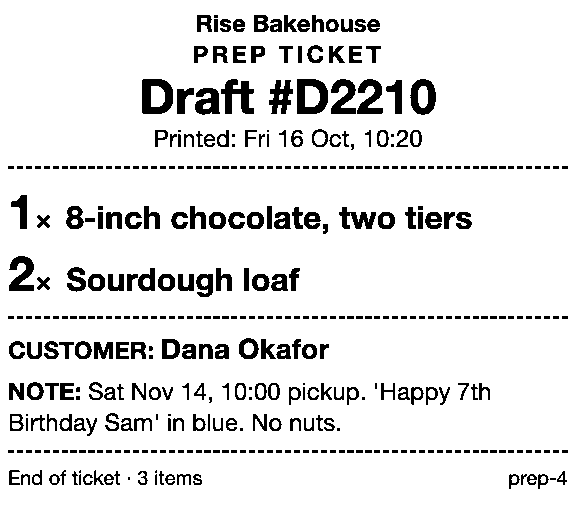
Prep Ticket works on Shopify POS Pro, and pricing will be announced before launch. It does one job, a clean ticket from a draft, so there are no kitchen screens, modifiers or routing to set up.
Which one fits your shop
Choose POS Cafe if you run a café or quick-service counter with a menu and modifiers, especially on POS Lite (without its draft features) or at three to 20 locations.
Choose Simmer if you want kitchen screens included in the price instead of on a separate Fresh KDS subscription. At one or two locations it costs about the same as POS Cafe; at three it’s US$90 a month, against US$59.
Choose Prep Ticket if your orders are already Shopify draft orders that staff open in POS, and you want a price-free ticket of the items on them without setting up prep areas or tagging products. That fits, for example, a bakery taking cake orders, a florist’s workroom or a shop that engraves, embroiders or frames to order.
If you run a café, start with a free trial: 21 days for POS Cafe, 30 for Simmer.
Get early access to Prep Ticket
Prep Ticket is from Countermade, the Shopify POS apps from Invenire Studios. Join early access and we’ll email you when it’s ready to try.
Thanks. You’re on the list, and we’ll email you when Prep Ticket is ready to try.
Common questions
Can Shopify POS print a kitchen ticket without an app?
Do POS Cafe and Simmer print to the receipt printer I already have?
Can POS Cafe print tickets for products that aren’t on its menu?
Do I need Shopify POS Pro for a kitchen ticket app?
Read next
About Prep Ticket- Comparison Which order printer apps print Shopify draft orders? Order Printer Pro, Printly and MS Order Printer compared, and when a ticket fits better.
- Guide How to print a Shopify draft order from POS Shopify has no Print button for drafts. Every workaround, and what each one prints.
- Guide Shopify POS: how to print an order before the customer pays Create the order now with Mark unpaid, or keep it as a draft and print that instead.
- Guide Which printers can print prep tickets from Shopify POS? Which 80mm Star and Epson printers Shopify supports, and how POS apps print to them.
- By trade How to print bakery order tickets in Shopify POS Get cake orders to the baker without prices, whether paid, part-paid or paid at pickup.
- By trade How to print a florist order ticket in Shopify POS Get the arrangement, card message and pickup time to the workroom without the price.