
AppsPrep Ticket
Print price-free prep tickets from Shopify POS drafts
Shopify POS can save an order as a draft, but the draft screen has no print option. Prep Ticket, from Countermade, adds one: a clean ticket for whoever prepares the order, with item names, quantities, customer and notes, and no prices.
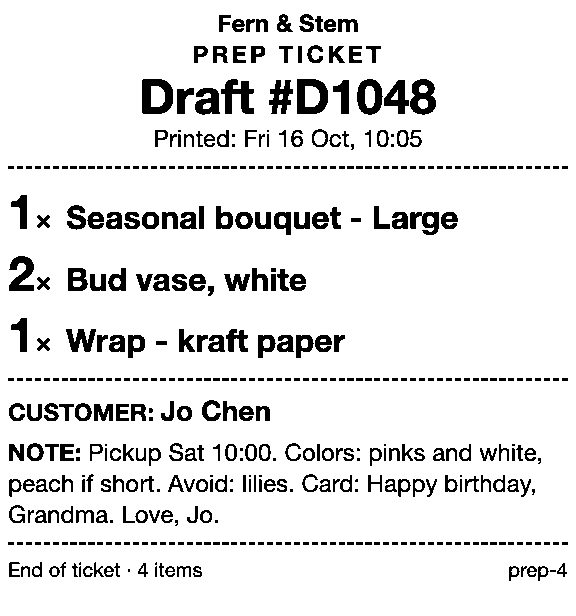
A Prep Ticket ticket for a florist order: items, quantities, customer and note, no prices.
How Prep Ticket works at the counter
-
Build the order in Shopify POS. For a pickup time on the ticket, tap ⋯ (More actions) at the top of the cart, then Add note, type it and tap Save. Tap ⋯ again, then Create draft order.
-
Tap the Order icon, then Drafts, and open the draft. For a draft made in the admin, set the filter to Admin.
-
Tap the Prep Ticket action in the draft’s menu, below Shopify’s own options.
Draft orderLoad to cartEmail to customerDelete draft orderPrint a price-free prep ticket for a…by Prep TicketA draft order’s actions in Shopify POS, with Prep Ticket’s action (outlined) under Shopify’s own. -
Tap Open print dialog.
Prep ticketDraft #D10481 × Seasonal bouquet - Large2 × Bud vase, white1 × Wrap - kraft paperPrinterNo receipt printer connected. Tap Open print dialog to print to another printer.Open print dialogWith no receipt printer paired, Prep Ticket tells staff and offers the iPad’s print dialog instead. -
Pick a printer and tap Print.
Page 1 of 1OptionsPrinterNo Printer Selected ›Copies1The iPad’s print dialog, opened by Prep Ticket. Tap Printer to choose an AirPrint printer.
What Prep Ticket does
Prep Ticket does
- Print a ticket from a POS draft order: items, quantities, customer and notes.
- Leave off prices, totals and tax, so the ticket can go straight to the bench, the workroom or the customer.
- Work with drafts made in Shopify POS or the Shopify admin.
- Print through the iPad’s print dialog to an AirPrint printer the iPad can reach.
Who Prep Ticket is for
Prep Ticket is for stores that take made-to-order and phone orders as POS drafts, then hand the job to someone else to make: bakeries taking custom cake orders, florists with a workroom, and engravers, framers and print shops. The customer pays later, at pickup or when the job is ready, and the person making it gets a ticket with everything they need and nothing they don’t.
What you need
- Plan
- Shopify POS Pro at each location using Prep Ticket.
- Device
- iPad running Shopify POS Pro.
- Printer
- an AirPrint printer the iPad can reach.
Guides for Prep Ticket
-
How to print a Shopify draft order from POS
Shopify has no Print button for drafts. Every workaround, and what each one prints.
-
Shopify POS: how to print an order before the customer pays
Create the order now with Mark unpaid, or keep it as a draft and print that instead.
-
Which printers can print prep tickets from Shopify POS?
Which 80mm Star and Epson printers Shopify supports, and how POS apps print to them.
-
Prep Ticket vs POS Cafe vs Simmer
Two café systems and a ticket printer for draft orders, with prices as of October 2026.
-
Which order printer apps print Shopify draft orders?
Order Printer Pro, Printly and MS Order Printer compared, and when a ticket fits better.
-
How to print bakery order tickets in Shopify POS
Get cake orders to the baker without prices, whether paid, part-paid or paid at pickup.
Questions about Prep Ticket
Which draft orders can Prep Ticket print?
Which printers does Prep Ticket print to?
Do I need Shopify POS Pro?
How much does Prep Ticket cost?
Get early access to Prep Ticket
A ticket printed from a POS draft order, with items, quantities and notes but no prices, for whoever prepares the order. We’ll email you once, when Prep Ticket is ready to try, and nothing else.
Thanks. You’re on the list, and we’ll email you when Prep Ticket is ready to try.
Also from Countermade, the Shopify POS apps from Invenire Studios: Pay Link, which turns a POS order into a link to Shopify’s own secure checkout.