
How to print bakery order tickets in Shopify POS
Updated · 4 min read
By Invenire Studios, makers of Countermade
The short answer
Once a cake order is rung up (paid, part-paid or unpaid), POS prints its receipt with prices, and Shopify’s Order Printer app a price-free packing slip after one template edit. Drafts don’t print. Prep Ticket, from Countermade, prints a clean, price-free ticket for the baker straight from a POS draft.
Ring it up as an order and print it
With a receipt printer, start with the POS receipt. Print the POS receipt at checkout or later from the order (Order icon > the order > Receipt), or, for an order paid in full, tap Print gift receipt for a receipt without the amount spent. Shopify says receipts can include order notes. Test-print each, including the receipt on a part-paid or unpaid order, to check the note shows.
For a full-page ticket without prices, use Order Printer. Install Shopify’s Order Printer app (free as of October 2026) and add its tile to your POS smart grid; it prints through the iPad’s print dialog.
Its default packing slip leaves out the note, so copy it in from the invoice: in the Shopify admin, go to Apps > Order Printer > Templates, open Invoice, click Edit code and copy the lines from {% if order.note %} to the next {% endif %}. Then open Packing slip, click Edit code, paste them where you want the note, and save.
For each order:
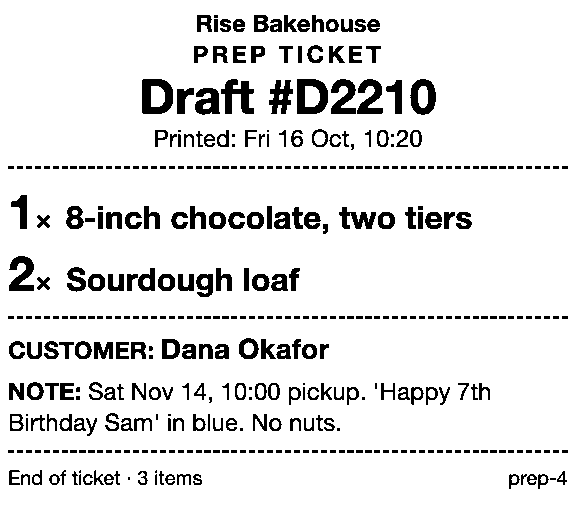
- Add the cake to the cart, or tap Add custom sale, title it for the baker (for example, “8-inch chocolate, two tiers”), enter the price and tap Add to cart.
- Tap Add customer and find or add the customer.
- Tap the ⋯ (More actions) icon at the top of the cart, then Add note. Put the pickup date and time on the first line, the design after it, and tap Save.
- Take payment in one of three ways (some EU locations, such as France, Italy and Spain, can’t use the last two):
- Paid now, collected later: tap the Pickup all items tile, then Checkout. This needs POS v11.3 or later, a POS Pro location, Pickup in store turned on and the “Fulfill shipping and pickup orders” permission.
- Deposit now: tap Checkout, then Split payment, take the deposit, and tap Mark as partially paid, then Mark as partial.
- Nothing now (for example, a phone order): tap Checkout, then Mark unpaid.
- Print the receipt, or tap Order Printer on the Home screen, select the order, choose your edited packing slip under Documents and tap Print documents.
Open a pickup order from the Order icon, tap Ready for pickup and Send notification when the cake is boxed, then Mark as picked up at collection. On a Partially paid order, tap Collect payment; for an unpaid one, see printing an order before the customer pays.
Test your route with one order, then clear it up; if you’ll take a deposit on a pickup order, test that too, since Shopify doesn’t document it. Settle size and items before the deposit: once you edit a part-paid order, or refund or exchange an item on it, Shopify says “you can’t receive additional payments on that order.”
Saved as a draft: no Shopify print option
A draft holds an order without creating it: a wedding cake quoted before the couple says yes, or a phone order you don’t want to ring up as unpaid yet. Build the cart with the customer and note as above, then tap the ⋯ (More actions) icon and Create draft order. At pickup, tap the Order icon, then Drafts, choose the draft, tap Load to cart and take payment.
Shopify’s order printing help says drafts “must be completed and converted to regular orders” first. How to print a Shopify draft order from POS covers the browser print, which shows prices. Some order printer apps list draft printing (as of October 2026).
What goes on a cake ticket
The baker needs what to make and when, not what it cost.
| The baker needs | Where to put it in Shopify POS |
|---|---|
| Cake, size, flavor | The product and variant, or the custom sale title |
| How many | The line quantity |
| Pickup date and time | The first line of the order note |
| Writing on top, colors, decoration | The order note |
| Customer name | The customer on the order |
| Allergy or dietary requests | The order note, written out in full |
A note might read: “Sat Nov 14, 10:00 pickup. ‘Happy 7th Birthday Sam’ in blue. No nuts.” A ticket repeats only what staff typed, so an allergy line is a message to the baker, not a replacement for your allergy process.
Where Prep Ticket fits
Prep Ticket is for bakeries that quote and hold cake orders as drafts. It’s part of Countermade, the Shopify POS apps from Invenire Studios. From a draft made in Shopify POS or the admin, it prints a bench ticket with item names, quantities, the customer and the notes, and no prices, so the baker sees what to make and when. It prints through the iPad’s print dialog to an AirPrint printer and works on Shopify POS Pro.
Get early access to Prep Ticket
Sign up for early access and we’ll email you when Prep Ticket is ready to try.
Thanks. You’re on the list, and we’ll email you when Prep Ticket is ready to try.
Common questions
Can I take a deposit on a cake order in Shopify POS?
Can Shopify POS print a ticket for a cake order?
Where do I put the pickup date in Shopify POS?
Do I need Shopify POS Pro for draft and pickup orders?
How do I keep prices off the baker’s ticket?
Read next
About Prep Ticket- By trade How to print a florist order ticket in Shopify POS Get the arrangement, card message and pickup time to the workroom without the price.
- By trade How to print a job ticket for a custom order in Shopify POS Engraving, embroidery or framing: where the spec goes and how to print it for the bench.
- Guide How to print a Shopify draft order from POS Shopify has no Print button for drafts. Every workaround, and what each one prints.
- Guide Shopify POS: how to print an order before the customer pays Create the order now with Mark unpaid, or keep it as a draft and print that instead.
- Guide Which printers can print prep tickets from Shopify POS? Which 80mm Star and Epson printers Shopify supports, and how POS apps print to them.
- Comparison Prep Ticket vs POS Cafe vs Simmer Two café systems and a ticket printer for draft orders, with prices as of October 2026.