
Shopify POS apps from Invenire Studios
Small apps for the Shopify POS counter.
Each Countermade app does one counter job, right inside Shopify POS: getting a phone order paid by link, or printing a clean ticket for whoever prepares the order.
Pay Link · checkout total
The apps
One job each, done inside Shopify POS
Both work inside Shopify POS Pro, where your staff already are. Join early access to try them first.
Turn a Shopify POS cart or draft into a link to Shopify’s checkout.
For phone orders: build the order in Shopify POS and Pay Link makes a link to Shopify’s own checkout, so staff never hear a card number.
See how Pay Link worksPrint price-free prep tickets from Shopify POS drafts.
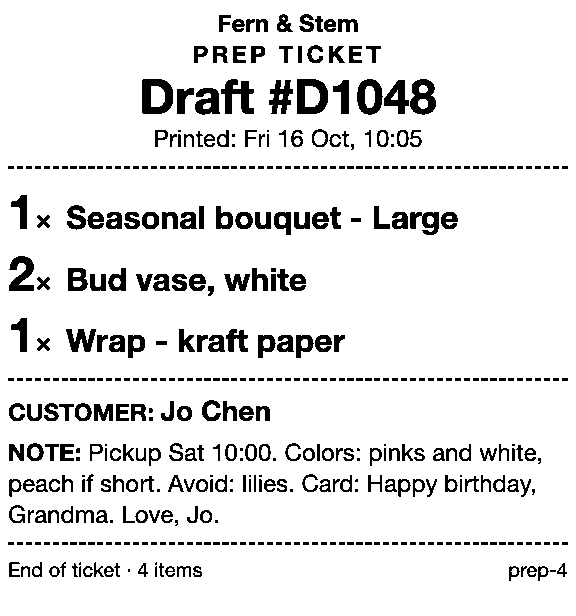
For orders someone has to make: puts the items, quantities, customer and note on paper, from drafts made in POS or the admin, through the iPad’s print dialog.
See how Prep Ticket worksStart with the question
Answers to the questions that come up at the counter
Each guide opens with a short answer you can act on.
Phone orders and payment links
- How to take phone orders on Shopify without asking for card details
- How to send a Shopify draft order payment link by text message
- Shopify payment links explained: draft orders, Quick Sale and POS
- Taking a card by phone in Shopify: key it in or send a link
- How to create a local delivery order in Shopify POS
Printing orders before payment
Get early access to Countermade’s apps
We’ll email you when each app is ready to try on your store, and nothing else. You can ask us to delete your details at any time.
Thanks. You’re on the list, and we’ll email you when each app is ready to try.