
Shopify POS gift receipt without prices: what to print now
Updated · 6 min read
By Invenire Studios, makers of Countermade
The short answer
Shopify POS prints gift receipts without prices: tap Gift receipt after a completed sale. Since August 11, 2026, Shopify’s new template leaves the items off too. To list items, print the order’s packing slip in the Shopify admin, or the default packing slip in Shopify’s free Order Printer app, also printable from POS. Neither default template includes prices. Before payment, print a price-free prep ticket from the draft with Prep Ticket, from Countermade.
How do I print a gift receipt without prices in Shopify POS?
Shopify describes a gift receipt as proof of purchase that “doesn’t contain the amount spent.” You can print one in Shopify POS for a completed sale, right after payment or later from the order. The option appears only if you have a receipt printer.
Right after the sale:
- On the Payment successful screen, tap Gift receipt.
Later:
- In Shopify POS, tap Orders.
- Tap the order.
- Tap Print gift receipt.
On Shopify’s new receipt template, a gift receipt prints the store’s header and footer from the receipt editor, such as the logo, return policy and any custom text, plus a scannable barcode linking to the original order. Shopify’s visual editor help says “line items, prices, quantities, and totals are omitted,” so it doesn’t show what’s in the bag.
Gift receipts “are for full orders only,” according to Shopify’s receipt help, so if the customer wants one for a single item, ring that item up as a separate order. If the counter has no receipt printer yet, see which receipt printers work with Shopify POS.
To email a gift receipt instead, the QuickGift: Email Gift Receipts app says it can “email price-free gift receipts from the POS.” As of October 2026, it has a free plan with 20 emailed gift receipts a month.
Why do Shopify POS gift receipts no longer show line items?
On Shopify’s new receipt template, since August 11, 2026, gift receipts leave out line items so you can print several at once. Stores on a customized Liquid receipt template keep their old gift receipt until they switch, or until January 1, 2027. Shopify’s changelog says: “Gift receipts no longer show line items so you can print multiple at once.”
Printing several at once suits a buyer with more than one gift bag, but not a store that used a gift receipt as a price-free item list for the workroom. For example, a bakery on the new template that printed gift receipts for the decorating bench now gets a slip that no longer lists the cake. For that job, see how bakeries print prep tickets in Shopify POS.
Switching from a customized Liquid template to the new one is irreversible, so check what your gift receipt prints before you flip the shop-level switch. See what changes when the receipt code editor ends in 2027 for the checklist.
To preview the new gift receipt, go to Sales channels > Point of Sale in the Shopify admin, click Edit for Receipts, and pick the gift receipt in the receipt type drop-down (visual editor help). To see what your store prints today, print a test gift receipt with a receipt printer connected.
Can I hide prices on a regular Shopify POS receipt?
Not with any setting Shopify documents. Shopify’s receipt editor help describes no setting that hides prices on a sale receipt. Print a gift receipt for a slip without the amount spent, or the order’s packing slip if the items need to be listed.
What can I print from Shopify that lists items but not prices?
For a completed order, including one taken with Mark unpaid (an order with nothing paid yet), print its packing slip from Orders in the Shopify admin, or print Order Printer’s default packing slip. The Shopify admin can’t print a draft until it’s completed as an order. To print a price-free item list from a draft in Shopify POS, use a prep ticket from Prep Ticket.
| Printout | Where you print it | Works for | Lists items? | Shows prices? |
|---|---|---|---|---|
| Gift receipt, customized Liquid template | Shopify POS | Completed sales, full orders | Depends on your template, until January 1, 2027 | No amount spent |
| Gift receipt, new template (since the August 2026 update) | Shopify POS | Completed sales, full orders | No | No |
| Packing slip | Shopify admin: Orders > order > Print | Orders | Yes, with SKU and quantity | Not among its documented fields |
| Order Printer packing slip (default template) | Shopify admin, or the Order Printer tile in Shopify POS | Orders | Yes, Qty and Item | No |
| Order Printer invoice (default template) | Shopify admin, or the Order Printer tile in Shopify POS | Orders | Yes | Yes |
| Pick list | Set up in Order Printer, printed from Orders | Orders | Yes | The fields you choose |
| Any Shopify admin printout of a draft | Shopify admin | Drafts: not until completed as an order | n/a | n/a |
| Prep ticket (Prep Ticket) | Shopify POS, from the draft | Drafts made in POS or the Shopify admin | Yes, with customer and notes | No |
How do I print a packing slip without prices for a Shopify order?
A packing slip lists the items in a package with their SKU and quantity. Its template’s item fields include title, variant, SKU and quantity, and none of them is a price. It’s built into the Shopify admin, so there’s nothing to install.
- From your Shopify admin, go to Orders.
- Click the order.
- Click Print > Print packing slips.
- Print or save the packing slip.
To change what it shows, go to Settings > Shipping and delivery, then in Documents click Packing slip template. Edit it and click Preview template before you save. Shopify’s packing slip help covers bulk printing too.
The packing slip is a shipping document, so it can include the customer’s shipping and billing addresses. Check it before it goes in a gift bag. If you want the card message on paper instead, see how to print a gift message in Shopify POS.
You can also print from the counter. Shopify’s Order Printer app prints through the browser’s print function, and its default packing slip has only Qty and Item columns, with no prices.
- From the Shopify admin: open the order, then click More actions > Print with Order Printer.
- From Shopify POS: tap Order Printer in the smart grid. Add the tile first if it isn’t there.
Can I print a Shopify draft order without prices?
Not with the Shopify admin’s own print options: Shopify says draft orders “must be completed and converted to regular orders before they can be printed.” Either tap Mark unpaid at checkout in Shopify POS, which makes it an order, then print its packing slip from Orders in the Shopify admin or from the Order Printer tile, or keep the draft and print a prep ticket from it, as the next section explains.
Mark unpaid isn’t available at checkout at some EU locations. To weigh Mark unpaid against keeping the draft, see how to print an order before the customer pays. For every way to print a draft from POS, see how to print a Shopify draft order from POS.
How do I give the workroom a price-free item list before the customer pays?
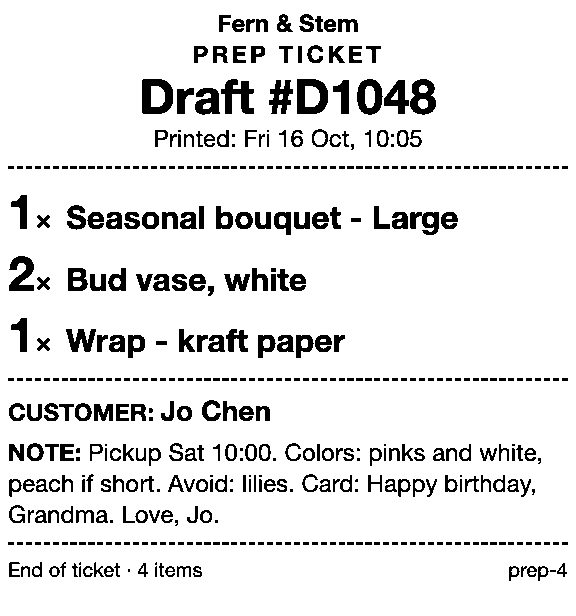
Use Prep Ticket, from Countermade, the Shopify POS apps from Invenire Studios. Take the order as a draft in Shopify POS and print a prep ticket from it: item names, quantities, the customer and notes, and no prices. It’s the item list a gift receipt used to give the workroom, ready before payment.
The order stays a draft until the customer pays, so there’s no Mark unpaid order to create first, and the workroom gets a ticket made for the job rather than a shipping document.
Prep Ticket prints through the iPad’s print dialog to a printer the iPad can reach (AirPrint). It works with drafts made in Shopify POS or the Shopify admin, and needs Shopify POS Pro. To print drafts from the Shopify admin instead, compare the order printer apps that print drafts.
For how a prep ticket compares with a receipt and a packing slip, see what a prep ticket is.
Next step
Print one gift receipt today and see what your template shows. If your workroom needs the item list before the customer pays, Prep Ticket prints it from the draft. Prep Ticket isn’t on the Shopify App Store yet. Join early access and we’ll email you when it’s ready to try.
Get early access to Prep Ticket
Thanks. You’re on the list, and we’ll email you when Prep Ticket is ready to try.
Common questions
Does a Shopify POS gift receipt show prices?
Why doesn’t my gift receipt list the items anymore?
How do I print an order without prices in Shopify?
Can I print a gift receipt for one item from a bigger sale?
Do I need a receipt printer for gift receipts in Shopify POS?
Read next
About Prep Ticket- Guide How to print a Shopify draft order from POS Shopify has no Print button for drafts. Every workaround, and what each one prints.
- Guide Shopify POS: how to print an order before the customer pays Create the order now with Mark unpaid, or keep it as a draft and print that instead.
- Guide Which printers can print prep tickets from Shopify POS? Which Star and Epson printers Shopify supports, and how POS apps print to them.
- Guide Recent cart or draft order: which to use in Shopify POS Recent carts delete after 24 hours by default. Drafts last a year unedited and can hold stock.
- Guide Shopify POS receipt code editor ends January 1, 2027: what to do The code editor ends January 1, 2027. What to check, rebuild and preview before you switch.
- Guide How to create a pickup order in Shopify POS Create a Shopify POS pickup order, mark it ready, notify the customer, and print a slip