
Shopify POS vs Square for a bakery: how order tickets print
Updated · 5 min read
By Invenire Studios, makers of Countermade
The short answer
Square prints order tickets itself: with a printer profile, each new sale prints one. Shopify POS has no order-ticket setting: it prints the customer receipt, prices included, and apps add tickets. Cafe apps print them for the line, and a cake taken days ahead is saved as a POS Pro draft, which a prep ticket app prints without prices. Square is simpler for a fast line; Shopify fits a bakery that sells online and takes cakes ahead.
How does Square print order tickets for a bakery?
Square prints a ticket for every new order once a printer is set to print order tickets. It prints automatically after each sale, even when no customer receipt prints, and item notes always appear on the ticket. Set-up lives in a printer profile in the Square POS app or in Square Dashboard.
The steps, from Square’s order ticket and printer profile help:
- In the Square POS app, tap ≡ More > Settings > Hardware > Printers > Profiles.
- Tap Create profile.
- Turn on Use this printer for in-person order tickets (and the online & kiosk option if you sell online).
- Choose the categories to print, and set kitchen names or compact tickets if you want them.
In Square Dashboard, profiles sit under Settings > Device management > Profiles > Printer profiles. Categories decide which items print on a ticket; otherwise a ticket lists every item.
Square works with printers that connect by Ethernet, Wi-Fi, USB, Bluetooth or AirPrint, though it advises against Bluetooth because of poor performance.
As of October 2026, Square KDS runs on Android devices, needs Square Plus or Premium, and is pitched as “replacing traditional paper tickets and kitchen printers”. Before paying for screens, weigh whether a kitchen screen pays off at your counter.
Can Square print a ticket for a cake order taken days ahead?
Save it as an Open Ticket, which holds an order so you can finish the sale later. Square’s help says you can print and close open tickets from the POS app, and print a bill before closing one. Its order-ticket help doesn’t cover orders taken days ahead.
Open Tickets is a free add-on: ≡ More > Add-ons > Open Tickets, then Add for free.
Orders customers place through Square Online are a separate route. Square’s bakery page offers online ordering where customers “place orders in advance”, and with Automatically Print New Orders on in an online & kiosk printer profile, those orders print “when it is time to make them”.
Orders taken outside the register altogether are another matter. One Square seller asked in 2023 for a “kitchen sheet” without prices for invoiced catering orders, because the kitchen “should not be privy to the costs and payments”.
Can Shopify POS print order tickets on its own?
Shopify POS has no order-ticket setting: it prints the customer receipt, prices included, and apps add tickets. Its supported-printer list covers receipt printers, and its printing help says draft orders must be completed and converted to regular orders before they can be printed. Cafe apps add tickets for counter sales, and a prep-ticket app prints draft orders.
The native home for a cake order taken ahead is the draft order, the same route as taking orders ahead at the counter. It needs POS Pro: add the pickup day with ⋯ > Add Note, then tap ⋯ > Create draft order. Paid, deposit and unpaid cake orders each get their own steps in how to print bakery order tickets in Shopify POS, and the admin side is covered in every native way to print a draft order.
Which Shopify POS apps print kitchen order tickets?
POS Cafe and Simmer, both on the Shopify App Store, print order tickets for counter food service. As of October 2026, POS Cafe starts at US$29.00 a month and Simmer costs US$30.00 a month per location.
Square’s own Square vs Shopify page, dated June 2022, marks Shopify “No” for a kitchen display. Apps like these now add one. POS Cafe, Simmer and Prep Ticket compared sets all three side by side.
What does each set-up cost a small bakery?
Square starts lower: its Free plan costs nothing a month, and order tickets are a printer setting, not an app. KDS screens are where Square’s costs climb. On Shopify, keeping cake orders as drafts needs POS Pro on top of your Shopify plan, and counter tickets need a cafe app.
| Monthly, as of October 2026 | Square | Shopify POS |
|---|---|---|
| POS plan per location | Free (US$0.00), Plus US$49.00, Premium US$149.00 | POS Pro US$89.00 per location, plus your Shopify plan |
| Tickets at the sale | Set up in a printer profile | Via an app: POS Cafe from US$29.00, Simmer US$30.00 per location |
| Kitchen screen | KDS US$30.00 per device (Plus) or US$20.00 per device (Premium); not on Free | Via an app (POS Cafe, Simmer) |
Is Shopify POS or Square better for a bakery?
Shopify POS, if you sell retail goods in store and online and the orders that matter are cakes taken days ahead: the draft holds the order and pickup day, and a prep ticket takes it to the baker. If your tickets come mostly from a fast coffee-and-food line, Square’s built-in tickets do the job.
| Order type | Square | Shopify POS |
|---|---|---|
| Line order | Prints automatically after each sale, from a printer profile | Printed by a cafe app such as POS Cafe or Simmer |
| Cake order taken ahead | Saved as an Open Ticket; Square’s help says you can print open tickets, or a bill, from the POS app | Saved as a draft order on POS Pro with the pickup day in the note, then printed without prices by a prep-ticket app |
Shopify’s own comparison page points to inventory that’s “always accurate online and in store”, which counts when, for example, the same loaves sell at the counter and on your website. If you’re making the move, moving your counter from Square to Shopify POS walks through it, and phone orders get their own comparison in Shopify POS vs Square for phone orders.
How do I print a price-free cake order ticket from a Shopify POS draft?
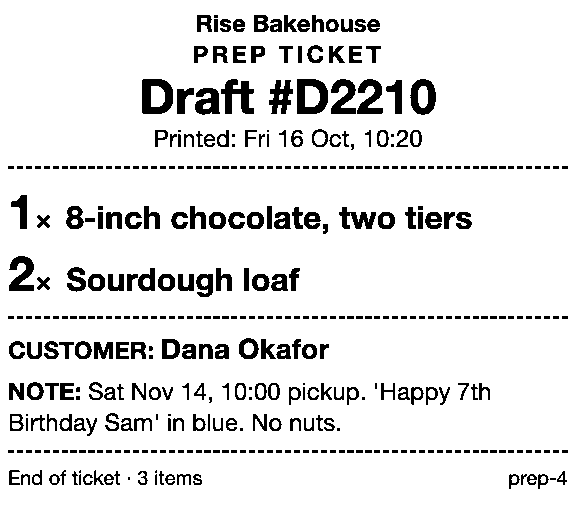
Save the cake order as a draft in Shopify POS, then print it with Prep Ticket, from Countermade (the Shopify POS apps from Invenire Studios). From the draft, it prints a prep ticket with item names, quantities, the customer and notes, and no prices, so the baker sees the note with the pickup day, not the bill.
- It prints through the iPad’s print dialog to a printer the iPad can reach (AirPrint).
- It needs Shopify POS Pro, the same POS Pro subscription your drafts already need.
If you’re choosing a printer, start with which printers can print prep tickets from Shopify POS. There’s more on the app at Prep Ticket.
Get early access to Prep Ticket
Prep Ticket isn’t on the Shopify App Store yet. Get early access and we’ll email you when it’s ready to try.
Thanks. You’re on the list, and we’ll email you when Prep Ticket is ready to try.
Common questions
Is Square or Shopify POS cheaper for a bakery’s order tickets?
Does Shopify POS have a kitchen display like Square KDS?
Do I need POS Pro to keep cake orders as drafts in Shopify POS?
Can I print a Shopify draft order as a prep ticket?
Do Square order tickets show the item notes?
Read next
About Prep Ticket- Comparison Prep Ticket vs POS Cafe vs Simmer Two café systems and a ticket printer for draft orders, with prices as of October 2026.
- Comparison Which order printer apps print Shopify draft orders? Order Printer Pro, Printly and MS Order Printer compared, and when a ticket fits better.
- Comparison Repair and service ticket apps for Shopify POS, compared Nine repair apps for Shopify stores compared, and when a printed ticket is enough.
- Comparison Shopify POS save-cart and draft order apps compared Recent carts, drafts, and four save-cart and draft apps compared, with prices as of Oct 2026.
- Guide How to print a Shopify draft order from POS Shopify has no Print button for drafts. Every workaround, and what each one prints.
- Guide Shopify POS: how to print an order before the customer pays Create the order now with Mark unpaid, or keep it as a draft and print that instead.