
Switching from Square to Shopify POS at the counter
Updated · 7 min read
By Invenire Studios, makers of Countermade
The short answer
Shopify’s free Store Migration app moves your Square products and customers, but your counter habits need new homes. All but one have a native route: recent carts or drafts for parked sales, Send cart for payment links, Manual card entry for keyed cards. Several need POS Pro. An app helps in two places: a price-free order ticket from a draft, and a payment link that shows staff the total up front and whether it has been paid.
How do I move my products and customers from Square to Shopify?
Shopify’s free Store Migration app imports your Square products and customers. Shopify’s migrating from Square guide also covers fulfilled orders, gift cards and saved cards. Saved cards move only if you ask Square Support; see repeat phone customers and card on file. Reviews can’t move from Square, and your in-person sales stay listed on the Transactions page of your Square Dashboard.
- Install Store Migration and import your products and customers from Square.
- Review the imported products, which arrive as drafts, and set them to Active.
- Check any items you priced by unit in Square: they import with a price of 0.
Once the data is in, work through the counter checklist below.
Which Square counter habits need a new home in Shopify POS?
Seven Square routines change at the counter. All but one have a native Shopify route; printing a ticket from a draft is the gap. An app helps with two: payment links, including for callers, and order tickets.
| On Square you… | In Shopify POS | Needs POS Pro? | Where an app helps |
|---|---|---|---|
| Send a payment link from checkout | Send cart by email, a draft’s Share > Copy link, or a Quick Sale Payment link (steps) | Send cart and drafts: yes | Pay Link, from Countermade |
| Key in a card for a caller | Manual card entry at checkout, or Collect payment > Credit card on an admin draft (steps) | Not a listed Pro feature | Pay Link (staff never see or type the card) |
| Start a sale and finish it later | Recent carts, or Create draft order for longer waits (reserve its items to hold stock) (steps) | Yes | – |
| Print an order ticket for the back | Shopify Order Printer once it’s an order; no draft print in Shopify’s POS help (steps) | Drafts: yes | Prep Ticket, from Countermade |
| Send an invoice or take a deposit | Draft invoice email; Mark as partially paid at checkout, except in some EU locations (deposits by plan) | Not a listed Pro feature | – |
| Text a receipt | Payment successful > Text > Send receipt | No (every paid plan) | – |
| Take payment now, hand over later | A POS pickup order (pickup orders) | Yes | – |
What replaces Square payment links in Shopify POS?
Send cart (More actions > Send cart, POS Pro) emails the customer a checkout link for the order, credited to your location and staff. To text a link, save the cart as a draft and use Share > Copy link in the Shopify admin, or make a Quick Sale payment link in the Shopify mobile app.
On Square, you tap Charge and then Send Payment Link, and share it by copying it, by text or by QR code (as of October 2026; which POS can send a payment link). The closest Shopify step is Send cart:
- Build the cart in Shopify POS and add the customer.
- Tap the ⋯ (More actions) menu, then Send cart.
- Check the customer’s email address and tap Send.
Send cart sends email only, needs the customer to pay for the whole order, and can’t credit staff signed in with a PIN.
To text a link:
- From a draft order. Save the cart as a draft (see saving a sale below), then click Share > Copy link in the Shopify admin and paste it into your own text. Full steps: how to send a Shopify payment link by text.
- From Quick Sale. In the Shopify app (the mobile admin app, not POS), tap Collect > Payment link > Share link.
Shopify POS payment link options compares every kind of link side by side.
How do I key in a card for a phone order in Shopify POS?
At checkout, tap Manual card entry, enter the card details and tap Charge. Shopify treats it as a card-not-present payment even with the customer at your counter, so it carries extra fraud risk, and your payment provider and device must both support it. On Square, as of October 2026, the same step is Manual Card Entry.
From the Shopify admin, open a draft order, click Collect payment in the Payment section, then Credit card, enter the details and click Charge. That route needs Shopify Payments.
A payment link lets the customer type their own card instead. If you used Square Virtual Terminal, read does Shopify have a virtual terminal. For phone orders on each platform, see Shopify POS vs Square for phone orders.
How do I save a sale and finish it later in Shopify POS?
A recent cart is for a customer who’ll be back in a few minutes: staff on other devices in the same store can pick it up. A draft order is for anything that waits longer or needs stock held: only drafts can reserve inventory, once you reserve the items on them, and recent carts delete after 24 hours by default. Both need POS Pro.
To save a draft and bring it back:
- In the cart, tap the ⋯ menu, then Create draft order.
- When the customer is ready, open your drafts in Shopify POS.
- Choose the draft and tap Load to cart, then take payment as usual.
Cart sharing across devices arrived in POS 11.11 on July 27, 2026, so update POS on every device before you rely on it. For the trade-offs, see recent carts vs draft orders.
How do I print an order ticket for the kitchen or workshop in Shopify POS?
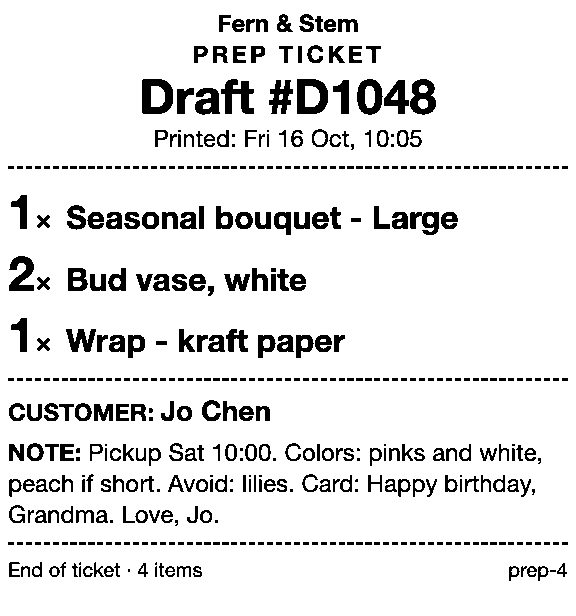
Shopify’s Order Printer prints orders from Shopify POS, and its help doesn’t mention drafts. Shopify’s POS draft-order help doesn’t include a print option either, so a ticket for a sale still waiting as a draft takes a workaround or an app. Prep Ticket prints a price-free ticket from a POS draft.
The native workarounds are in how to print a Shopify draft order from POS, and printing before the customer pays is covered in print an order before payment.
As of October 2026, Square sells kitchen printers “to print and send order tickets right to your bar or kitchen.” For a bakery, see Shopify POS vs Square for order tickets.
A Square seller taking catering orders asked for a kitchen sheet without prices.
Skip the gift receipt as a stand-in: since August 11, 2026, Shopify’s gift receipts no longer show line items. If you’re weighing a screen against paper, see kitchen display vs printed ticket.
Can I use my Square card reader with Shopify POS?
Square’s card readers aren’t on Shopify’s supported reader list, though Shopify’s Square guide says “some of your hardware might be compatible.” Shopify lists a supported device, card reader and receipt printer as what a permanent location needs, so plan for a supported reader and printer at each counter.
As of October 2026, the supported list is Tap & Chip (US), Chip & Swipe, Chipper 2X BT, Shopify POS Terminal, BBPOS WisePad 3 and Verifone Victa Mobile. If a printer won’t connect after the switch, see receipt printer not printing.
Which Square replacements need Shopify POS Pro?
The Pro column in the checklist shows which: recent carts, POS draft orders, Send cart and pickup orders. POS Pro is a monthly add-on for each POS location, and Shopify’s retail migration guide recommends it for businesses with retail locations. If only one of your locations needs these, see Shopify POS Lite vs Pro for counter orders.
Which apps help after switching from Square to Shopify POS?
Two counter jobs go better with an app after switching from Square: payment links and order tickets. Countermade, the Shopify POS apps from Invenire Studios, makes Pay Link, which builds a payment link from the POS cart and shows staff the total up front, and Prep Ticket, which prints a price-free ticket from a POS draft. Both need POS Pro.
Where Send cart emails the customer a checkout link, Pay Link is built around what staff see at the counter. Before the link is made, staff see the total, with a note when checkout will add shipping, and afterwards staff can see whether the link has been paid. The customer pays on Shopify’s own secure checkout, so staff never see or type card details. A double tap makes one link, not two.
Checkout asks the customer for a delivery address and may add shipping, so turn on local pickup at your store and a customer who’s collecting can choose it.
Prep Ticket is for order tickets. From a draft order in Shopify POS, it prints a ticket with item names, quantities, customer and notes, and no prices, through the iPad’s print dialog to a printer the iPad can reach (AirPrint). It works with drafts made in POS or the Shopify admin.
Before your first day on Shopify POS
Print the checklist table and walk your staff through it.
Get early access to Pay Link and Prep Ticket
Pay Link and Prep Ticket aren’t on the Shopify App Store yet. Get early access and we’ll email you when they’re ready to try.
Pick one app or both
Thanks. You’re on the list, and we’ll email you when each app is ready to try.
Common questions
Can I move my products and customers from Square to Shopify?
Can Shopify POS send a payment link like Square?
Does Shopify POS print order tickets like Square?
Can I still text receipts in Shopify POS?
Do I need POS Pro after switching from Square?
Read next
About Pay Link- Guide How to take phone orders on Shopify without asking for card details Send the caller a checkout link by email or text, set pickup, then check it’s paid.
- Guide How to send a Shopify draft order payment link by text message Shopify only emails invoices. Copy the checkout link and text it from your own phone.
- Guide Shopify payment links explained: draft orders, Quick Sale and POS Every way Shopify bills by link, what each creates and where the paid order lands.
- Guide Taking a card by phone in Shopify: key it in or send a link Key a caller’s card or send a checkout link: when each fits, and how to turn keying off.
- Guide How to create a local delivery order in Shopify POS Local delivery at the POS checkout: the taps, the rules, and how to deliver phone orders.
- Guide How to take pre-orders at the counter in Shopify POS Shopify pre-orders are online only. Here’s the POS routine for dated counter and phone orders.