
Which order printer apps print Shopify draft orders?
Updated · 4 min read
By Invenire Studios, makers of Countermade
The short answer
Order Printer Pro, Printly and MS Order Printer list draft printing and Shopify POS support, each with a free plan (as of October 2026). None says its draft option shows on the POS draft screen, so test before you pay. Prep Ticket, from Countermade, prints a price-free maker’s ticket right from the POS draft.
Does Shopify Order Printer print draft orders?
No. Shopify Order Printer is Shopify’s free app for order documents, and Shopify’s printing help is plain about drafts: “Draft orders must be completed and converted to regular orders before they can be printed.” Order Printer’s print steps start from an order, in the admin (More actions > Print with Order Printer) or in Shopify POS (add the Order Printer tile to the smart grid, then tap it).
What Shopify lets you do with a draft, without an app
Shopify has no print option for a draft, in POS or in the admin. Your browser’s Print command can print the admin draft page, prices included, but not from the POS app.
- In Shopify POS (POS Pro locations only), you can load a saved draft to the cart, update it, delete it or email it to the customer. To see drafts made in the admin, filter the Drafts list to Admin (the Sale type filter).
- Once the draft becomes an order, because the customer pays or you tap Mark unpaid at checkout in POS (not allowed at some EU locations), Shopify Order Printer prints it, or the admin’s Print > Print order page gives a basic summary with no app.
Apps can add to the admin Print menu only on orders and products, so look for a document app’s draft option under More actions on the draft or drafts list, or in the app.
Every native route is in the guide to printing a Shopify draft order from POS.
Order printer apps for draft orders, compared (as of October 2026)
From each app’s Shopify App Store listing and help pages, checked October 18, 2026. Prep Ticket is ours.
| App | Maker | Drafts? | POS? | Price | Rating | Built for |
|---|---|---|---|---|---|---|
| Shopify Order Printer | Shopify | No, orders only | Yes, from the smart grid | Free | 3.6 (380 reviews) | Invoices, packing slips, pick lists |
| Order Printer Pro | Order Printer (not Shopify) | Yes | Yes | Free to 50 orders a month; US$10, US$20 or US$40 a month by order volume, up to 10,000 orders | 4.9 (2,989 reviews) | Invoices; quotes from drafts |
| Printly – Invoice Print | StartExecution | Yes | Yes | Free for 50 prints; US$1.99, US$5.99 or US$20 a month | 4.8 (30 reviews) | Invoices and order documents |
| MS Order Printer – PDF Invoice | Magestore | Yes | Yes | Free to 100 orders a month; US$6.99 or US$29.99 a month | 5.0 (310 reviews) | PDF invoices, quotes, receipts, packing slips |
| Prep Ticket | Countermade | Yes, from Shopify POS | Yes, needs POS Pro | Announced before launch | — | A ticket without prices for whoever makes the order |
For third-party apps, the POS column is the listing’s own claim; the next section shows how to check it.
Order Printer Pro isn’t made by Shopify, despite the name. It has the most reviews, carries the Built for Shopify badge and prints drafts on every plan, free included.
Printly has the cheapest paid plans. Its plan limits cover order and draft prints: 50 free, 100 on US$1.99, unlimited above that.
MS Order Printer has the biggest free plan of the three draft printers, 100 orders a month, and its US$6.99 plan is unlimited.
Check a document app on a POS draft before you pay
Order Printer Pro’s POS help starts from an order opened in the POS app: tap Print with Order Printer Pro, with the printer already set up on that iPad or phone. Neither that page nor the three listings mention the POS draft screen, and Printly’s and MS Order Printer’s listings link no help center. So check two things on a free plan or trial.
- Does the option appear on a draft? Save a test draft in POS, open it and look in its menu, next to Load to cart and Email to customer.
- What paper does it need? Order Printer Pro’s templates default to A4 or Letter; its help says they won’t print on narrow POS receipt paper and suggests A5 or 4x6 inch. Printly and MS Order Printer list receipts as a document type but don’t mention receipt printers or paper. MS Order Printer says its templates can be adjusted to any paper size. Test on your own paper.
For hardware, see printers for prep tickets from Shopify POS.
An invoice is not a prep ticket
Document apps mostly print customer paperwork: invoices with your logo and totals, packing slips and, on some, quotes. That’s the right paper when the customer needs a price.
The person making the order needs what to make, how many, for whom, and the notes. Prices, tax and payment lines are noise at the bench. A florist on a phone order needs stems, card message and delivery name, not the total.
To get that from a document app, adapt its template: Order Printer Pro’s can be customized down to the code, and Printly and MS Order Printer have live-preview editors. Try removing the prices, then test on a draft.
What goes on the ticket depends on the trade: see prep tickets for florists, bakeries and made-to-order shops.
Where Prep Ticket fits
Prep Ticket comes from Countermade, the Shopify POS apps from Invenire Studios. It’s for stores that save orders as POS drafts and need a ticket for whoever makes them, before the customer pays. From a draft order in Shopify POS, it prints a prep ticket with item names, quantities, customer and notes, and no prices.
- It works with drafts made in POS or the Shopify admin.
- It prints through the iPad’s print dialog, to a printer the iPad can reach (AirPrint).
- It works on Shopify POS Pro.
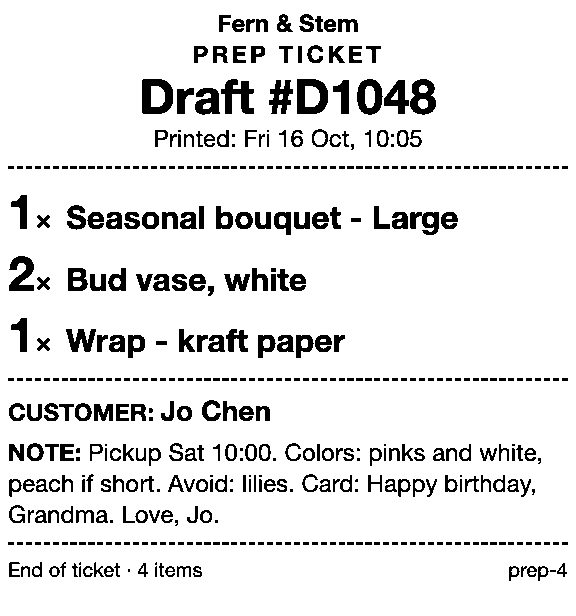
More on the Prep Ticket page.
Get early access to Prep Ticket
If you need a ticket without prices from your POS drafts, join early access and we’ll email you when Prep Ticket is ready to try.
Thanks. You’re on the list, and we’ll email you when Prep Ticket is ready to try.
Common questions
Can Shopify Order Printer print draft orders?
Which apps can print a Shopify draft order?
Do order printer apps print drafts from Shopify POS?
Can order printer apps print on a receipt printer?
How do I print a draft order without prices for my staff?
Read next
About Prep Ticket- Comparison Prep Ticket vs POS Cafe vs Simmer Two café systems and a ticket printer for draft orders, with prices as of October 2026.
- Guide How to print a Shopify draft order from POS Shopify has no Print button for drafts. Every workaround, and what each one prints.
- Guide Shopify POS: how to print an order before the customer pays Create the order now with Mark unpaid, or keep it as a draft and print that instead.
- Guide Which printers can print prep tickets from Shopify POS? Which 80mm Star and Epson printers Shopify supports, and how POS apps print to them.
- By trade How to print bakery order tickets in Shopify POS Get cake orders to the baker without prices, whether paid, part-paid or paid at pickup.
- By trade How to print a florist order ticket in Shopify POS Get the arrangement, card message and pickup time to the workroom without the price.