
Apps that automatically print new Shopify orders
Updated · 6 min read
By Invenire Studios, makers of Countermade
The short answer
Shopify’s printing settings cover receipts for POS sales: on POS Pro, POS can print a receipt on your default printer after each sale. A new online order gets a “New order” email or app notification, not a print. To print online orders as they arrive, you need an app such as PrinterCo, Orders Printer or a cafe app, and some, such as PrinterCo, need their own app left running on a device at the shop.
Can Shopify print new orders automatically on its own?
For sales rung up in POS, yes: a POS Pro location can print a receipt automatically on the connected default printer after each sale. Shopify’s printing settings don’t cover new online orders. Those appear in the POS Orders list, and Shopify alerts the staff you add as recipients by email or push notification.
To turn on automatic receipts in POS:
- Tap the menu icon, then Settings.
- Under Orders, tap Printed receipts.
- Turn on Automatically print receipts, and set Number of receipts printed with - or +.
In the Shopify admin, the same setting is under Sales channels > Point of Sale > Customize the in-store experience > Receipts > Edit. Shopify’s printing options help notes it’s available only at POS Pro locations. If POS receipts stop coming out, see fixing a Shopify POS receipt printer that won’t print.
The POS Orders screen “displays all of your store’s orders, whether they were placed online or in person.”
To hear about new ones, add yourself as a recipient of the New order staff notification, which is “sent when a customer places an order”; how to know when a payment link is paid has the steps.
Account owners get every new order by default, and the Shopify app can send push notifications. Either way, someone still prints the order.
Which apps print new Shopify orders automatically?
PrinterCo and Orders Printer say they print new online orders by themselves, and GcAnyOrder forwards each order to its own app for printing. Simmer says online orders print in the kitchen, and POS Cafe sends order tickets to printers or KDS screens.
Prices, ratings and review counts are from each Shopify App Store listing, as of October 2026. “Not stated” means the listing doesn’t say.
| Route | Prints new orders by itself? | What must stay on at the shop | Printers | Price | Rating |
|---|---|---|---|---|---|
| Shopify POS receipts | Yes, after each POS sale only | The POS device and its connected default printer | Your connected default receipt printer | Included in POS Pro | n/a |
| Shopify New order notification | No: an email or push alert | n/a | n/a | Included | n/a |
| PrinterCo Automatic Printing | Yes, online orders as they’re placed | Its app, on an Android tablet, Windows PC or POS terminal | Epson, Star Micronics, Bixolon, most ESC/POS; USB, Bluetooth, Ethernet; A4 on Windows | US$13/mo + US$0.075 per print; US$23/mo with 100 prints, then US$0.045; US$33/mo unlimited; 7-day trial | 4.3 (10) |
| Orders Printer | Yes, per its listing | Not stated | Not stated | US$19.99/mo, 7-day trial | 3.0 (7) |
| GcAnyOrder-Goodcom Printer | Forwards orders to the GcAnyOrder App to print | The GcAnyOrder App (device not stated) | Not stated | Free | No reviews yet |
| Simmer | Online orders print in the kitchen | Not stated | Epson and Star ticket printers | US$30/mo per location, 30-day trial | 4.7 (23) |
| POS Cafe | Not stated; sends order tickets to printers or KDS screens | Not stated | Lists Star CloudPRNT and Epson Server Direct Print | US$29 to US$199/mo, 21-day trial | 5.0 (28) |
| Shopify Order Printer | No: you select orders and print | The device you print from | Through the browser’s print dialog | Free | 3.6 (381) |
| Order Printer Pro | No: bulk print by hand; automatic delivery is of PDFs | The device you print from | The device’s printer | Free to US$40/mo | 4.9 (3,001) |
| Prep Ticket, from Countermade | On demand: staff print from a POS draft | The iPad running POS | A printer the iPad can reach (AirPrint) | Early access | n/a |
PrinterCo says it will “automatically print online orders as soon as they’re placed.” On the listed prices, the per-print Plus plan is cheapest up to about 183 prints a month, the Grow plan up to about 322, and the US$33 Unlimited plan beyond that, which also routes orders to different printers.
Orders Printer, by Team Bistro, describes itself in one line: “Print orders automatically directly from your online store.” Its listing names no supported printers.
GcAnyOrder is free and forwards your orders to Goodcom’s platform, which works with the GcAnyOrder App to print them.
Simmer and POS Cafe are cafe systems. Simmer says online orders “show up as tickets on KDS and are printed in your kitchen”. POS Cafe sends order tickets to printers or its Fresh KDS screens. See the cafe apps compared, or read whether you need a screen or paper in the kitchen.
Do I need a computer or tablet left on to auto-print Shopify orders?
For PrinterCo, yes: it runs through its own app on a device at the shop. Its developer says “the app must be running either in the background or on a dedicated mobile device.” The exception is a cloud printer that fetches orders itself, such as Star’s CloudPRNT models.
GcAnyOrder prints through its own GcAnyOrder App, and neither its listing nor Orders Printer’s says what has to stay running, so ask before you commit.
What is CloudPRNT, and does it work with Shopify?
CloudPRNT is a feature of some Star receipt printers. The printer checks a server for new web orders and prints them, with no PC or tablet needed at the shop. It still needs an app on the Shopify side that sends your orders to that server.
Star’s CloudPRNT page says the printer “automatically detects and pulls Web-based orders and requests directly from the server” and “doesn’t even require a host PC or tablet in the premises.” Star lists the mC-Print2, mC-Print3, TSP654II, TSP743II, TSP847II and SP742 as compatible.
POS Cafe is one listing that names CloudPRNT. Merchants have asked whether a CloudPRNT printer will print local pickup orders on its own; the answer depends on the app. For printers that work with Shopify POS itself, see which receipt printers work with Shopify POS.
Can Shopify Order Printer or Order Printer Pro print orders automatically?
No. Shopify Order Printer and Order Printer Pro print order documents, many at once, when someone selects orders and taps print. Order Printer is free and prints up to 50 orders at a time. Neither prints a new order the moment it lands, so they suit paperwork printed in a batch.
In the admin, select orders, then choose Print with Order Printer from the menu; in POS, tap Order Printer in the smart grid. Shopify Order Printer prints through your browser’s print function.
Order Printer Pro prints draft orders on every plan and bulk prints from the admin, POS and mobile. Its “automatic” feature is delivery of PDF invoices, receipts and quotes, not printing. For templates and quotes, see which order printer apps print draft orders.
What if you need a ticket for orders taken at the counter, not online?
Auto-print apps serve orders that arrive online. Orders taken at the counter or by phone are different. Saved as drafts in Shopify POS, they still need a ticket for whoever makes them, printed when staff choose, straight from the draft. That’s where Prep Ticket, from Countermade (the Shopify POS apps from Invenire Studios), fits.
From a draft order in Shopify POS, Prep Ticket prints a prep ticket with item names, quantities, customer and notes, and no prices. For example, a cafe takes a phone order for a birthday cake, saves it as a draft, and prints a ticket for whoever is baking it, with the name, the order and the card message.
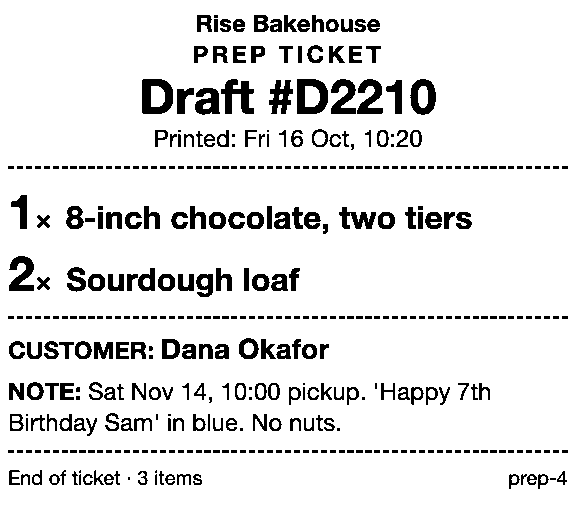
It prints through the iPad’s print dialog to a printer the iPad can reach (AirPrint). If no printer is set up, staff are told so and offered the print dialog instead. If the iPad finds no printer at all, see no AirPrint printers found in Shopify POS. It works with drafts made in POS or the Shopify admin. It needs Shopify POS Pro. For the native options, see every way to print a draft from POS.
Get early access to Prep Ticket
Decide what must stay on at your shop, then check the app supports your printer before you buy. Prep Ticket isn’t on the Shopify App Store yet. Get early access and we’ll email you when it’s ready to try.
Thanks. You’re on the list, and we’ll email you when Prep Ticket is ready to try.
Common questions
Can Shopify automatically print online orders?
How do I turn on automatic receipt printing in Shopify POS?
Do auto-print apps need a computer left on?
Can I print a ticket for an order taken at the counter before it’s paid?
How much do auto-print apps for Shopify cost?
Read next
About Prep Ticket- Comparison Prep Ticket vs POS Cafe vs Simmer Two café systems and a ticket printer for draft orders, with prices as of October 2026.
- Comparison Which order printer apps print Shopify draft orders? Order Printer Pro, Printly and MS Order Printer compared, and when a ticket fits better.
- Comparison Repair and service ticket apps for Shopify POS, compared Nine repair apps for Shopify stores compared, and when a printed ticket is enough.
- Comparison Shopify POS save-cart and draft order apps compared Recent carts, drafts, and four save-cart and draft apps compared, with prices as of Oct 2026.
- Comparison Shopify POS vs Square for a bakery: how order tickets print How each platform gets a bakery order onto paper, from the morning rush to Saturday’s cake.
- Guide How to print a Shopify draft order from POS Shopify has no Print button for drafts. Every workaround, and what each one prints.