
How to see Shopify orders by pickup date, one day at a time
Updated · 6 min read
By Invenire Studios, makers of Countermade
The short answer
Shopify orders and drafts have no pickup-date field, and the Date filter means the day the order was placed. So record the collection day yourself: put it first in the order note in Shopify POS, and add it as a tag (for example collect-2026-12-23) in the Shopify admin or the Shopify mobile app. Then filter Drafts or Orders by that tag, and save the Orders view. Tags carry over when a draft becomes an order.
Does Shopify have a pickup date field for orders?
No. Shopify’s pickup in store has an “Expected pickup date” setting, but it’s a processing time you choose for each location, shown at checkout (see Shopify’s pickup in store settings). The customer doesn’t choose a day at checkout. Orders and drafts carry tags and a note instead, and those are where the collection day goes.
The draft order form’s only dates are when reserved stock is released and when payment is due. Shopify’s POS 11.3 announcement of orders for future pickup mentions no pickup date.
Merchants have asked for exactly this view and been pointed at apps. You can build it yourself with notes and tags.
Where should I write the collection date on a Shopify POS order?
Write it as the first words of the order note, in the same format every time, such as “COLLECT 23 DEC AM”, and put the same day in the order’s tag. The note shows on the order’s details screen and in the export’s Notes column, and it prints on a prep ticket, so readers see the day first.
In Shopify POS:
- Build the order in the cart.
- Tap the horizontal menu icon, then Add note (see Shopify’s order notes help).
- Type the collection day first, then anything else.
- Tap Save.
- For pay on collection, tap Create draft order. If the customer pays now, check out as a pickup order instead. Taking Christmas pre-orders at the counter covers which to choose.
For where else a note appears, see where POS order notes print.
How do I tag Shopify draft orders with the collection day?
Add one tag per collection day, in the Shopify admin or the Shopify mobile app, as soon as the draft is saved. The note is for people; the tag is what Shopify filters on. For example, collect-2026-12-23 for December 23.
Use the same tag for every order due that day, include the year, keep it lowercase with no spaces, and keep it within the 40-character limit for order and draft tags.
As you take each order. In the admin, type the tag in the draft’s Tags section and click Save. In the Shopify mobile app, tap # Tag in the Tags section, type or tap the tag, then tap Save or ✓, and Save or ✓ again to save the draft.
Catching up. If some drafts were saved without a tag, open each untagged draft in the admin to read its note. Then, on the Drafts page, select the drafts due on the same day, click the horizontal menu icon and choose Add tags. Paid orders work the same way from the Orders page.
You don’t need to tag twice. When you create an order from a draft, Shopify carries the draft’s tags over to the order.
How do I list every order for one collection day in the Shopify admin?
Filter by the day’s tag: on Drafts for unpaid orders, on Orders for orders paid ahead. Save the Orders filter as a view so the list is one click away each morning. Don’t rely on the Date filter or on searching for the note text.
Unpaid drafts:
- Go to Drafts.
- Click Search and filter, then Tag.
- Choose the day’s tag, such as
collect-2026-12-23.
Orders paid ahead:
- Go to Orders.
- Add the Tagged with filter and enter the day’s tag.
- Optionally, add Fulfillment status: Unfulfilled.
- Click Save and name the view, for example “Collect Dec 23”.
To see two days at once, add a comma in the Tagged with filter and type the second day’s tag. On a phone, the Shopify mobile app has the same filters on its Filter by screen.
| Where the order is | How to list it | What you need |
|---|---|---|
| Unpaid draft | Drafts > Search and filter > Tag | The day’s tag on the draft |
| Order paid ahead | Orders > Tagged with, saved as a view | The day’s tag (carried over from the draft, or added on Orders) |
| POS pickup order | Orders > Tagged with | The day’s tag, added on Orders after checkout, because it was never a draft |
Can I print a run sheet of Shopify orders for collection day?
For paid orders, yes: filter the Orders list by the day’s tag and export it. The CSV has a Notes column and a Tags column, so each order carries its collection day and instructions. Shopify’s export help covers orders, not drafts.
From Orders, apply the day’s view and click Export. Up to 50 orders, or the current page, download straight away. Open the CSV in a spreadsheet and print it in the order it came. An order with several items takes several rows, with many fields left blank on the extra rows, so sorting would split it up.
How do staff find each order in Shopify POS on collection day?
Open Orders > Drafts in Shopify POS. Each draft shows its items, the customer, the day it was saved and its #D number, so find the customer’s name there or search the #D number. For paid orders, search the customer’s name. The list runs by the day the order was taken, so use the admin view to know who’s coming.
Then load the draft to the cart and take payment, as in loading a draft in Shopify POS. For preparing pickup orders, see creating a pickup order in Shopify POS. If a draft made elsewhere is missing, see when a draft doesn’t show in POS.
When is a Shopify pickup-date app worth it?
When customers order online and need to choose a collection day at checkout, because Shopify’s own pickup in store doesn’t ask for one. Date-picker apps add that choice, and some tag each order with the date for you. For counter and phone orders, the note and tag routine above does the job.
For example, Slotly has a free plan and a US$15.00 a month plan that tags orders with the date, as of October 2026.
How do I print a prep ticket for each order and file it by collection day?
Shopify has no Print option for draft orders, so the bench works from one ticket per order. Print each ticket while the order is still a draft and file it under its collection day: the stack for December 23 is that day’s run sheet. Prep Ticket, from Countermade, prints a price-free ticket from the draft in Shopify POS.
The ticket shows the item names, quantities, customer and note, with no prices. Because the collection day leads the note, the bench sees it with the items.
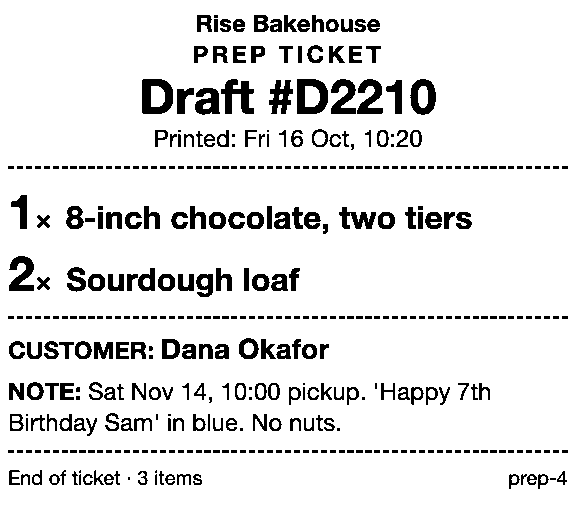
It prints through the iPad’s print dialog to a printer the iPad can reach (AirPrint). It needs Shopify POS Pro and works on drafts made in POS or the Shopify admin. Prep Ticket is part of Countermade, the Shopify POS apps from Invenire Studios.
The same routine suits bakery order tickets and a butcher’s Christmas collection days. For the other options, see every way to print a draft from POS.
Next step
Tag tomorrow’s orders tonight and save the view. Prep Ticket isn’t on the Shopify App Store yet: join early access and we’ll email you when it’s ready to try.
Get early access to Prep Ticket
Thanks. You’re on the list, and we’ll email you when Prep Ticket is ready to try.
Common questions
Can I sort Shopify orders by pickup date?
Do tags on a draft order stay when the customer pays?
Can I search Shopify orders by the note?
How long can an order tag be in Shopify?
Can customers choose a pickup date at checkout in Shopify?
Read next
About Prep Ticket- Guide How to print a Shopify draft order from POS Shopify has no Print button for drafts. Every workaround, and what each one prints.
- Guide Shopify POS: how to print an order before the customer pays Create the order now with Mark unpaid, or keep it as a draft and print that instead.
- Guide Which printers can print prep tickets from Shopify POS? Which Star and Epson printers Shopify supports, and how POS apps print to them.
- Guide Recent cart or draft order: which to use in Shopify POS Recent carts delete after 24 hours by default. Drafts last a year unedited and can hold stock.
- Guide Shopify POS receipt code editor ends January 1, 2027: what to do The code editor ends January 1, 2027. What to check, rebuild and preview before you switch.
- Guide How to create a pickup order in Shopify POS Create a Shopify POS pickup order, mark it ready, notify the customer, and print a slip