
How gift basket and hamper shops take phone orders in Shopify POS
Updated · 5 min read
By Invenire Studios, makers of Countermade
The short answer
Build the basket in the Shopify POS cart with the buyer as the customer and the recipient, delivery date and card message in the order note, then save it as a draft order (POS Pro). Add the recipient’s address as its shipping address in the admin. Pack from the draft on screen or a price-free prep ticket, since Shopify prints packing slips only for completed orders. The buyer pays by checkout link: Share > Copy link.
Where do I put the recipient, card message and delivery date on a gift basket phone order in Shopify?
In a Shopify draft order, the buyer is the customer, the recipient’s address is the shipping address, and the recipient’s name, delivery date and card message go in the order note, labeled, in the same order every time. Shopify’s help describes no delivery-date field, so the date leads the note.
A merchant asked Shopify’s community in August 2026 for delivery-date and card-message fields. For now, use these fields:
| Detail on the call | Where it goes in Shopify |
|---|---|
| Buyer (name, email or phone) | The customer on the cart or draft |
| Recipient’s address | The draft’s shipping address (admin: Customer section > Edit shipping address) |
| Recipient’s name and phone, delivery date, card message | The order note, labeled |
| Delivery day or occasion | A tag (up to 40 characters each) |
| Ribbon, wrapping or a one-off extra | A custom item (not tracked as inventory) |
For example: “DELIVER: Fri, Dec 11 / TO: [recipient’s name], [recipient’s phone] / CARD: ‘Happy birthday, love from all of us’ / FROM: [buyer’s name]”, tagged “2026-12-11”. Add the address and tag after saving, in the Shopify admin.
Related: corporate gift orders for one buyer sending to several people, and florist phone orders.
How do I save a gift basket or hamper phone order in Shopify POS before the buyer pays?
Save the cart as a draft order instead of checking out. It keeps the basket, buyer and note together, and you can load it in POS at any location or open it in the admin. Saving drafts in POS needs a POS Pro location.
- Add the basket’s products and any custom items, then add the buyer as the customer.
- In the Cart section, tap the menu icon > Add Note, type the order note and tap Save.
- Tap the menu icon > Create draft order.
The note and customer carry into the draft. To change it later, use Load draft order > Load to cart, then Update draft order. Shopify says a draft’s checkout might not support bundles, so test a bundled basket first. More in draft orders in Shopify POS.
How does the packer get a list of what goes in the gift basket without the price?
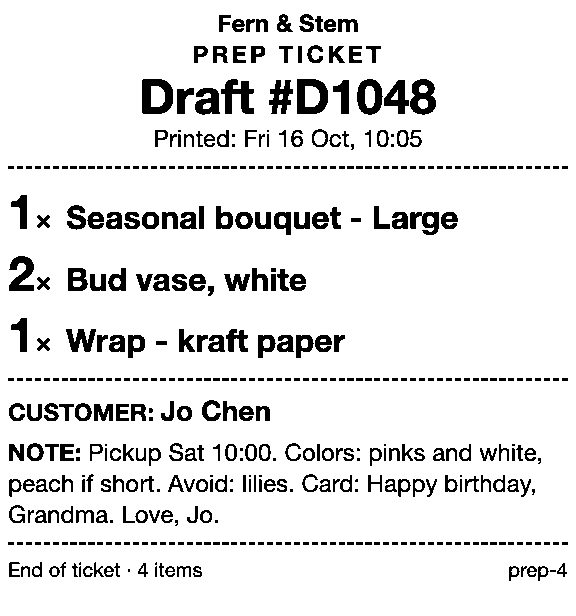
Shopify POS offers no print action on a draft, and packing slips need a completed order, so before the buyer pays, staff pack from the draft on screen or print a price-free prep ticket from an app.
Once the buyer pays, the draft becomes a paid order, and you can print its packing slip from the order’s page in the admin. Printing the gift message covers adding the note.
Since August 11, 2026, gift receipts on Shopify’s new receipt template no longer show line items, so don’t pack from one. See gift receipts without prices and every workaround for printing a draft.
How does a buyer who isn’t in the shop pay for a gift basket?
Send the buyer a checkout link from the draft. They enter their billing details, choose a shipping method and pay on Shopify’s checkout, so nobody reads a card number over the phone. Don’t mark it paid before the money arrives.
- Share the link from the admin: once the recipient’s address is on the draft (above), Share > Copy link, and paste it into a text or email (sending a payment link by text).
- Send cart from POS: when you haven’t saved a draft, the cart’s menu (More actions) > Send cart, enter the buyer’s email and send. It needs POS Pro, takes the whole amount and stays a draft until paid.
For a buyer who’s collecting, set Pickup in store on an admin draft and share that link instead, because Send cart has no step for choosing pickup.
How do I let a gift basket buyer choose local delivery or pickup instead of shipping?
The buyer picks a shipping method at checkout, so switch on Local delivery, which delivers straight from your shop, and Pickup in store, so checkout can offer Local delivery when the recipient’s address is in your delivery zone, and Pickup in store when the buyer collects. Both are set per location, under Settings > Shipping and delivery.
You can set a custom rate on an admin draft with Add shipping or delivery, but loading that draft in POS (for Send cart, say) removes the rate. More in stopping shipping on a payment link and local delivery orders from Shopify POS.
Is there a faster way to pack and take payment for gift basket phone orders in Shopify POS?
Yes, with two apps from Countermade. Prep Ticket prints a ticket from the POS draft with item names, quantities, customer and notes, and no prices. Pay Link makes the checkout link straight from the POS cart, and the buyer pays on Shopify’s own secure checkout, so staff never see or type card details.
Prep Ticket prints the packer’s ticket from the saved draft through the iPad’s print dialog (AirPrint), with the date, recipient and card message from the note and no price. Pay Link makes the buyer’s checkout link from the POS cart, with no trip to the admin. Checkout asks the buyer for a delivery address, so ask them to enter the recipient’s; there’s no admin address step on this route.
Pay Link shows staff the total up front, with a note when checkout will add shipping, and staff can see whether the link has been paid. A double tap still makes one link, not two. Both apps need Shopify POS Pro.
On your next hamper call, type the note in the DELIVER / TO / CARD / FROM order above.
Get early access to Prep Ticket and Pay Link
Prep Ticket and Pay Link are Countermade’s Shopify POS apps from Invenire Studios. Neither is on the Shopify App Store yet; get early access and we’ll email you when they’re ready to try.
Pick one app or both
Thanks. You’re on the list, and we’ll email you when each app is ready to try.
Common questions
Can Shopify POS add a delivery date to a phone order?
Where should the card message go on a gift basket order so the packer sees it?
Can I use a gift receipt as the packing list?
Can the buyer pay by link if the basket goes to someone else?
Do I need Shopify POS Pro to save hamper orders as drafts in Shopify POS?
Read next
About Pay Link- By trade How to take florist phone orders in Shopify POS and get paid Get paid for a phone order without hearing a card number, and charge local delivery on it.
- By trade Taking phone orders at a Shopify trade counter A Shopify route for each way trade customers pay: on collection, by card or on terms.
- By trade How to take furniture phone orders and deposits on Shopify Email a checkout link, take a deposit in store and invoice the balance, all on Shopify.
- Guide How to take phone orders on Shopify without asking for card details Send the caller a checkout link by email or text, set pickup, then check it’s paid.
- Guide How to send a Shopify draft order payment link by text message Shopify only emails invoices. Copy the checkout link and text it from your own phone.
- Guide Shopify payment links explained: draft orders, Quick Sale and POS Every way Shopify bills by link, what each creates and where the paid order lands.