
Lightspeed vs Shopify POS for special orders and work orders
Updated · 7 min read
By Invenire Studios, makers of Countermade
The short answer
Lightspeed Retail (R-Series) has special orders, layaways and work orders built into its Sales and Service menus. Shopify POS handles special orders with pickup orders and draft orders on POS Pro, and layaways and deposits with partial payments. It has no built-in work-order module, so repair shops add an app such as WorkMate or RepairRight. If repair work is most of your day, Lightspeed fits better.
Can Shopify POS handle the special orders, layaways and work orders I run in Lightspeed?
Mostly, yes. Special orders, deposits and quotes have a native Shopify POS route, and layaways run as a manual, deposit-style workflow; the pickup-order and draft routes need POS Pro. Work orders are the real gap: Shopify has no Service module, so a repair shop adds an app.
| Job | Lightspeed Retail (R-Series) | Shopify POS, built in | Shopify app that fills the gap |
|---|---|---|---|
| Special order | Sales > Special Order; out-of-stock items can go straight onto a purchase order or transfer; “Ready, Not Called” until staff tick Called | Sell at zero stock; a pickup order for items “expected to be available later” (POS Pro, v11.3), then Send notification; or a draft saved in POS (POS Pro) | Prep Ticket and Pay Link, from Countermade (rows below); WorkMate for bike shops |
| Layaway | Sales > Layaway; items reserved; deposit at Payment | Mark as partially paid, then Collect payment later; reserve stock on a draft in the Shopify admin | Reservo Deposits & Layaway; Layaway: Reserve & Deposit |
| Deposit | Optional on a special order; online deposit request from a work order | POS partial payments (not in some EU locations); admin deposits on drafts are Shopify Plus only | Deposit and layaway apps: see deposits by Shopify plan |
| Work or repair order | Service > New Work Order; statuses Open, Estimate, Waiting, Finished; Labor tab | No work-order module | WorkMate (bike shops), RepairRight: repair ticket apps compared |
| Quote | Print Quote or Send As Email from the work order | A draft saved in POS, prices locked in the admin, then sent with Email to customer: quotes in Shopify POS | Pay Link, for the full amount once the customer says yes |
| Ticket for the bench or back room | Print Tag links the item to the work order | See printing a draft order from POS | Prep Ticket, for jobs saved as a draft in POS or the admin |
| Payment when it arrives | Complete the Ready For Pickup items and take payment, deposit applied | Collect payment on a partially paid order, or the customer pays the draft’s link | Pay Link: a full-amount link when nothing has been paid yet |
As of October 2026. Shopify’s own Lightspeed comparison doesn’t cover special orders, layaways or deposits. Lightspeed details come from its Retail (R-Series) help center: special orders, layaways and work orders.
How do I take a special order in Shopify POS if I’m used to Lightspeed’s Special Order screen?
Use a pickup order when the customer pays now, a draft order when they pay later, or simply sell the item at zero stock. Since POS v11.3 (March 2026), a pickup order can include items “expected to be available later”, and staff notify the customer when it’s ready.
In Lightspeed, the special-ordered item can go straight onto a purchase order, and the order sits at “Ready, Not Called” until someone ticks Called. In Shopify POS, the pickup order holds the paid order: when stock arrives, tap Ready for pickup and Send notification. A draft holds an unpaid order, and in the Shopify admin you can reserve stock you already have on it.
Shopify’s purchase order help doesn’t tie a purchase order to the customer waiting for it, so write the customer and supplier details in the order note.
If overselling is off, a customer can’t pay a draft’s link for an item with no stock until you receive it. Special orders in Shopify POS walks through both routes step by step.
How do I run a layaway or take a deposit in Shopify POS without Lightspeed’s Layaway menu?
Take part of the payment and mark the order partially paid. Shopify’s layaway article (June 2026) says POS supports “a manual, deposit-style workflow”, though it “isn’t a built-in layaway program with balance tracking and item holding”. For holds that expire and reminders, add a layaway app.
At checkout, tap Split payment, choose the payment method, enter the deposit, tap Mark as partially paid and confirm with Mark as partial. When the customer comes back, open the order and tap Collect payment. Shopify’s partial payments help adds one limit: once you edit, exchange or refund the order, it can’t take further payments.
Two layaway apps that work with Shopify POS, as of October 2026: Reservo Deposits & Layaway, from US$19.00 to US$39.00 a month, with deposit links, reminders and stock holds that expire; and Layaway: Reserve & Deposit, US$17.00 a month. For more, see deposits by Shopify plan and holding an item for a customer.
Does Shopify POS have work orders like Lightspeed’s Service module?
Not built in. Lightspeed’s Service module gives each work order statuses, a Labor tab, a printed tag and an online deposit request. On Shopify you add an app: WorkMate for bike shops, or a repair-ticket app such as RepairRight for other trades.
Shopify’s bike-store page calls WorkMate “a Shopify app designed exclusively for bike shops”, with work orders and repair status updates. RepairRight launched October 9, 2026; as of October 2026 it has a free plan for 5 tickets a month and Pro at US$79.00 a month. Repair ticket apps compared has the full side-by-side.
How do I give a customer a quote in Shopify POS?
Save the cart as a draft order in POS, lock its prices in the Shopify admin (⋯ > Lock product pricing), then send it with Email to customer. The lock holds “a quoted price” even if the product’s price changes later; quotes in Shopify POS has the full steps. The draft loads back into the cart when the customer says yes.
Drafts created since April 1, 2025 are deleted after a year with no activity, so open and update a long-running quote before the year is up. See draft orders deleted after one year.
How do I print a ticket for the bench or back room from a Shopify POS draft order?
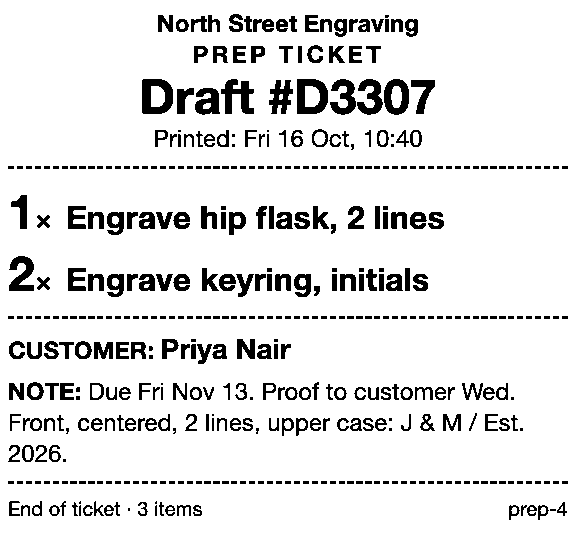
Save the job as a draft order in Shopify POS or the admin, then print it with Prep Ticket, from Countermade: a price-free ticket with item names, quantities, customer and notes, so it can go to the bench with the job. It prints through the iPad’s print dialog (AirPrint) and needs POS Pro.
For Shopify’s own options, see printing a draft order from POS. See also what a prep ticket is and prep tickets for made-to-order work.
How do I collect the balance when a special order arrives?
If the customer paid a deposit, open the order in Shopify POS and tap Collect payment. If nothing’s paid yet, send a link for the full amount: the draft’s own link, or Pay Link, from Countermade, which builds the link from the order in Shopify POS and needs POS Pro.
The draft’s own link is copied in the Shopify admin (Share > Copy link on the draft). Pay Link suits a special order paid in full on arrival. The customer pays on Shopify’s own secure checkout and staff never see card details. A double tap still makes only one link, and staff can see whether the link has been paid. Turn on local pickup for the store so the customer can choose pickup at checkout instead of paying for shipping; Pay Link shows staff the total up front, with a note when checkout will add shipping.
Should I stay on Lightspeed if repairs and work orders are my core business?
Yes, if most of your counter time is repairs with labor, statuses and tags. Lightspeed’s Service module does that in one place; on Shopify, you’d run it in a separate app. Switch if your counter is mostly special orders, layaways and quotes, your online store is on Shopify, and repairs are occasional.
For example, a jeweller doing repairs most days would lean on that Service module; one taking the odd repair can run it through an app such as RepairRight. Merchants asked about exactly this switch in 2021.
Pickup orders and drafts in POS need POS Pro; see POS Lite vs Pro for counter orders. Lightspeed’s other POS, X-Series, has a Shopify App Store listing that connects it to a Shopify store, from US$89.00 a month as of October 2026.
Next step
List the jobs you ran in Lightspeed last month and match each one to a row in the table. If most of them land on a built-in route, Shopify POS Pro covers your counter; add an app only for the rows that need one.
Pay Link and Prep Ticket aren’t on the Shopify App Store yet. Join early access and we’ll email you when they’re ready to try.
Pick one app or both
Thanks. You’re on the list, and we’ll email you when each app is ready to try.
Common questions
Does Shopify POS have special orders like Lightspeed?
Can Shopify POS do layaway?
Does Shopify have work orders for repairs?
Can I take a deposit on a special order in Shopify POS?
Does Shopify link a special order to a purchase order like Lightspeed?
Read next
About Pay Link- Comparison Shopify POS payment links: native options vs Pay Link Shopify’s payment link options at a POS counter, and where Pay Link fits.
- Comparison Pay Link vs Checkout Links vs Shopify Quick Sale Two POS apps and Shopify’s own Quick Sale, compared on price, POS fit and checks.
- Comparison Shopify POS vs Square for phone orders and payment links A phone order on Shopify POS and Square, step by step, with fees checked October 2026.
- Comparison Shopify POS Lite vs Pro for orders not paid at the counter Save, send to pay, print, pickup, delivery, staff credit: what each POS plan lets you do.
- Comparison Do I need a Shopify invoice app, or just a payment link? Send invoice emails a checkout link. Which Shopify tools make the PDF, and which take payment.
- Comparison Shopify Quick Sale vs Shopify POS: which should you use Quick Sale is a phone checkout; POS runs the counter. Which to use for each kind of sale.