
Keep Square with a Shopify sync app, or switch to Shopify POS?
Updated · 7 min read
By Invenire Studios, makers of Countermade
The short answer
Square and Shopify don’t connect on their own; Square’s comparison page says there’s no integration. A sync app from the Shopify App Store links them, from US$15.00 a month as of October 2026, and higher plans copy Square sales into Shopify. Shopify POS comes with every paid Shopify plan. POS Pro, US$89.00 a month per location on top of your plan, adds drafts, emailed carts and staff credit.
Is there a built-in Square integration for Shopify?
No. Square’s own comparison page says “there is not a Square Shopify integration,” although its pricing page points to Thrive Inventory for syncing your Square catalog and stock with Shopify. In practice, stores add a sync app to keep the two matched.
Depending on the app and the plan, a sync carries products, stock, customers and Square orders, with gift cards on higher plans such as DPL Platinum.
How do you connect Square to Shopify with a sync app?
You connect them through a sync app from the Shopify App Store, not a Shopify setting. Square sales reach Shopify only on a plan that includes order sync.
- Install a Square sync app from the Shopify App Store (the main ones are in the table below).
- Choose which system is your source of truth for products and stock, where the app asks. SquareShop lets you pick. Square’s pricing page points to Thrive Inventory, which keeps Square as the source.
- Link your Square and Shopify locations.
- Match products by shared SKUs, as DPL does, so a sale in one system takes the item off the other’s stock count.
- Turn on order sync if you want Square sales in Shopify. Only some plans include it, such as DPL Gold and Zon Premium.
What does a Square sync app cost, and what does it sync?
As of October 2026, Square sync apps on the Shopify App Store cost US$15.00 to US$99.99 a month; DPL’s own site lists larger plans from US$199.99 for up to 10,000 orders a month. Stock-only plans keep counts matched so you don’t sell an item twice. Copying Square orders into Shopify takes a higher plan, such as Zon Premium (US$49.99) or DPL Gold (US$59.99), each capped at 1,000 orders a month.
Square sync apps on the Shopify App Store (as of October 2026)
| App | Monthly price | Syncs | Square orders into Shopify | Rating (reviews) | Launched |
|---|---|---|---|---|---|
| DPL Square Integration | US$39.99 Silver, US$59.99 Gold, US$99.99 Platinum | Products, stock, customers; gift cards on Platinum | Gold: 1,000 a month. Platinum: 3,000 a month | 4.9 (244) | Sep 2023 |
| Zon Square Integration | US$29.99 Standard, US$49.99 Premium, US$99.99 Enterprise | Stock; customers from Premium | Premium: 1,000 a month. Enterprise: 3,000 a month | 5.0 (1) | Apr 2026 |
| SquareFloww | US$19.00 Starter (manual sync), US$39.00 Growth, US$79.00 Pro | Products, stock, customers | Not listed | No reviews yet | May 2026 |
| SkuHarmony | US$49.99 | Stock | Not in plan details | 4.4 (17) | Apr 2018 |
| SquareShop | US$15.00 | Stock counts, from the system you choose as the source of truth | Not listed | No reviews yet | May 2024 |
How much does Square plus a sync app cost compared with Shopify POS Pro?
As of October 2026, for one location billed monthly, Shopify Basic + POS Pro costs US$128.00. With Square Free, the sync route costs less while you copy no more than 1,000 Square orders a month into Shopify: US$54.00 to US$118.00 on a plan without order sync, or US$88.99 to US$98.99 with order sync. A 3,000-order plan brings it to US$138.99, more than POS Pro.
Example: one store, one location, billed monthly (as of October 2026)
| Setup | Monthly | What you get at the counter |
|---|---|---|
| Shopify Basic + POS (included) | US$39.00 + US$0.00 = US$39.00 | One catalog and stock count; in-person selling included |
| Shopify Basic + Square Free + DPL Silver | US$39.00 + US$0.00 + US$39.99 = US$78.99 | Products and stock synced; Square orders stay in Square |
| Shopify Basic + Square Free + DPL Gold | US$39.00 + US$0.00 + US$59.99 = US$98.99 | Plus up to 1,000 Square orders a month in Shopify |
| Shopify Basic + Square Free + DPL Platinum | US$39.00 + US$0.00 + US$99.99 = US$138.99 | Plus up to 3,000 Square orders and 500 gift cards a month |
| Shopify Basic + Square Plus + DPL Gold | US$39.00 + US$49.00 + US$59.99 = US$147.99 | Plus Square Plus features such as staff management; KDS is US$30.00 a month per screen extra |
| Shopify Basic + POS Pro | US$39.00 + US$89.00 = US$128.00 | One catalog and stock count; drafts in POS, Send cart, staff credit |
Shopify Basic is US$29.00 a month if you pay yearly (as of October 2026).
Card fees, as of October 2026, sit close together. Square charges 2.6% + 15¢ per in-person card payment on Square Free. Shopify Payments charges 2.6% + 10¢ in person on Basic.
Shopify POS Lite vs Pro covers what each one runs.
One more cost if you switch: Shopify POS doesn’t list Square’s readers among its supported card readers, so you’ll need new ones. Shopify’s start at US$49.00 for the Tap & Chip reader (as of October 2026).
What does Shopify POS Pro do at the counter that a Square sync doesn’t bring?
On POS Pro, staff can save a cart as a draft that holds the stock, email the cart for the customer to pay, with the sale credited to the store and staff member, and email a saved draft to the customer. Square has its own open tickets and payment links; Shopify’s versions live inside Shopify POS, so they need the counter to be Shopify POS.
Counter jobs on Square and on Shopify POS Pro (as of October 2026)
| Counter job | Square | Shopify POS Pro |
|---|---|---|
| Park an order and finish it later | Open tickets save an order to complete later. Tickets open longer than 180 days are removed, and checkout with Square invoices isn’t supported | A recent cart (shared across the store’s devices, deleted after 24 hours by default, no stock held) or a draft that holds stock and loads at any location. See recent carts vs draft orders |
| Send the cart to the customer to pay online | A payment link from Charge > Send Payment Link, shared by copy, text or QR code | Send cart emails the cart. The sale is credited to the POS channel, the location and the staff member (staff signed in with a PIN aren’t tracked). See how a phone order works on each |
| A link from a saved order | Links to Collect a payment, Sell an item or Accept a donation, made in the POS app | A draft’s checkout link, copied in the Shopify admin (Share > Copy link), with prices locked by default. See POS payment links compared |
| Order tickets for the back | Order tickets print automatically for each new order, with item notes always shown | With the Prep Ticket app (below): a price-free prep ticket from a draft. See order tickets for a bakery on each |
For any sale at the counter, POS Pro lets you add the staff member to the sale, and the POS total sales by staff member report shows who sold what. Staff attribution walks through it.
Should I keep the Square sync or switch to Shopify POS?
Keep Square and a sync if most sales are paid on the spot; switch to Shopify POS Pro if orders often finish later, online or by phone. On Pro, drafts hold those orders, Send cart and checkout links collect the payment, and one catalog means there’s no sync to watch.
Food counters run on lines and tickets to the kitchen. Square prints an order ticket for each new order, and a stock sync keeps the online store from overselling. If printed order tickets on Square Free cover your day and you sync no more than 1,000 Square orders a month, the sync is the cheaper route; add Square Plus and a KDS screen, and the sync route costs more than POS Pro. Kitchen display vs printed ticket compares the two ways to get orders to the back.
Switching pays off when orders wait: for example, a cake ordered on Tuesday for Saturday, a phone order paid by link, or a special order waiting on stock. On POS Pro each one waits as a draft.
Shopify’s free Store Migration app imports your Square products and customers. Square categories don’t map to Shopify’s standard product categories, so set those up again. Then work through the habit-by-habit checklist for the move. If you’re moving from Clover instead, see switching from Clover to Shopify POS.
Which apps add payment links and prep tickets to Shopify POS Pro?
Countermade, the Shopify POS apps from Invenire Studios, adds two counter jobs to POS Pro. Pay Link turns an order built in the POS cart into a payment link for the customer. Prep Ticket prints a price-free prep ticket from a draft. Both work from orders in Shopify POS and need POS Pro.
With Pay Link, from Countermade, the customer pays the full order total on Shopify’s own secure checkout, and staff never see or type card details. Staff see the total up front, with a note when checkout will add shipping (turn on local pickup at the store so the customer can choose pickup). Tapping twice by accident still makes only one link, not two, and staff can see whether a link has been paid.
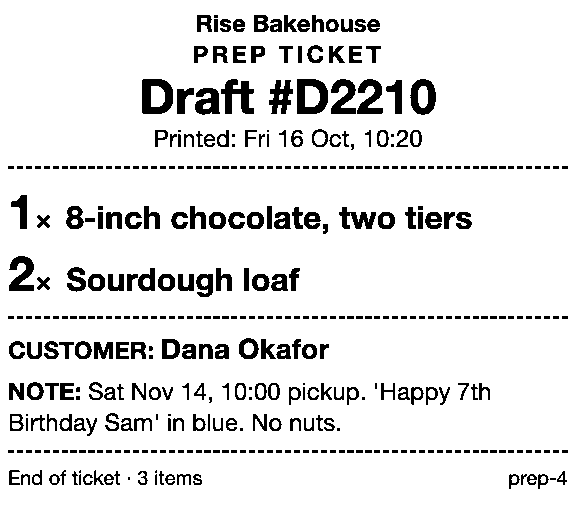
Prep Ticket, from Countermade, prints a price-free prep ticket from a draft in Shopify POS: items, quantities, customer and notes, through the iPad’s print dialog. It works on drafts made in POS or in the Shopify admin.
Next step
Start the free Store Migration import to see your Square catalog in Shopify, then work through the switch checklist before you move the counter.
Pay Link and Prep Ticket aren’t on the Shopify App Store yet. Get early access and we’ll email you when they’re ready to try.
Pick one app or both
Thanks. You’re on the list, and we’ll email you when each app is ready to try.
Common questions
Does Square integrate with Shopify?
How much does a Square Shopify sync app cost?
Do Square sales show up in Shopify reports?
Can I use my Square card reader with Shopify POS?
Can I move my Square products to Shopify for free?
Read next
About Pay Link- Comparison Shopify POS payment links: native options vs Pay Link Shopify’s payment link options at a POS counter, and where Pay Link fits.
- Comparison Pay Link vs Checkout Links vs Shopify Quick Sale Two POS apps and Shopify’s own Quick Sale, compared on price, POS fit and checks.
- Comparison Shopify POS vs Square for phone orders and payment links A phone order on Shopify POS and Square, step by step, with fees checked October 2026.
- Comparison Shopify POS Lite vs Pro for orders not paid at the counter Save, send to pay, print, pickup, delivery, staff credit: what each POS plan lets you do.
- Comparison Do I need a Shopify invoice app, or just a payment link? Send invoice emails a checkout link. Which Shopify tools make the PDF, and which take payment.
- Comparison Shopify Quick Sale vs Shopify POS: which should you use Quick Sale is a phone checkout; POS runs the counter. Which to use for each kind of sale.