
Sell-by-weight apps for Shopify POS, compared (2026)
Updated · 7 min read
By Invenire Studios, makers of Countermade
The short answer
In Shopify POS itself, you work out the price and ring it up as a custom sale; unit pricing only displays a price per unit. To turn a weight into a price at the till, add an app. Counter apps such as Filljoy Sell by Weight, Weigh Kit and MiMi price a weighed cart line, and barcode apps read the label your scale prints.
What can Shopify POS do with weighed products without an app?
Without an app, you work out the price and ring it up as a custom sale. Unit pricing shows customers a price per unit, but it comes from the product price, so it never changes what you charge. Neither tool turns a weighed amount into a price at the till.
To ring up a custom sale in Shopify POS:
- From your smart grid, tap the Add custom sale tile.
- Add the price. For example, 212 g of Comté at US$42.00 a kilogram is US$8.90.
- Optional: add a title and adjust the quantity.
- Tap Add to cart.
Custom sales show up differently in reports; see how to find custom sales in reports.
Merchants on the Shopify Community forums describe a workaround: price per 10 g and enter the weight as the quantity. One merchant called it “a hack”.
Which sell-by-weight apps work with Shopify POS in 2026?
As of October 2026, Shopify POS sell-by-weight apps split by how the weight gets in. Filljoy Sell by Weight can read a scale through special hardware at extra cost. In Weigh Kit, VahaPOS, Alumify: Weigh it, F: POS Sell by Weight, MiMi and Weyify, staff type the weight; MiMi also scans scale labels. TPM Weightify’s and Unitpricer’s listings give few details.
They also differ in cost per extra location, stock by weight and offline use. “Not stated” means the listing is silent.
| App (developer) | Price per month | Extra POS locations | How the weight gets in | Stock by weight | Offline |
|---|---|---|---|---|---|
| Sell by Weight for POS (Filljoy) | US$25.00 | +US$10.00/month each | Scale via special hardware (extra cost) | Not stated (lists automatic inventory adjustments) | Not stated |
| Weigh Kit: POS Sell by weight (Commerce Kits) | US$15.00 (1 location), US$59.00 (up to 5), US$99.00 (unlimited) | By plan | Staff key in the weight; pick the item by search or barcode | Gram-accurate | Keeps weighing when POS loses connection |
| VahaPOS: Sell By Weight & QR (TinyToolsCloud) | US$2.99 to US$69.99 by plan | By plan (2 to 5) | Staff enter the weight; prints QR labels with weight and price; scale needs custom hardware | Not stated | Not stated |
| Alumify: Weigh it (Alumify) | US$9.99 | Not stated | Staff type the weight; no scale connection | Not stated | Not stated |
| F: POS Sell by Weight (Final Apps) | US$9.00 to US$39.00 by plan | By plan (1 to 5); +US$5.00/month per location on Enterprise | Staff type a decimal or fraction | Leftover weight tracked across locations | Not stated |
| Sell by Weight & More for POS (MiMi) | Free to install; additional charges may apply | Unlimited | Staff type the scale reading or scan its label | To the gram, synced to Shopify | Not stated |
| Weyify POS by Weight (Weyify) | US$15.00, or US$165.00/year | Not stated | Staff type the weight | Not stated | Not stated |
| TPM Weightify (tpm solutions) | Free | Not stated | Not stated | Not stated | Not stated |
| Unitpricer Sell by Weight Size (Unitpricer) | From US$9.00 | Not stated | Not stated | Not stated | Not stated |
| App | Tare (container weight) | Rating (reviews) | Launched |
|---|---|---|---|
| Filljoy Sell by Weight | Manual or saved containers | 4.6 (40) | 2020 |
| Weigh Kit | Saved containers | No reviews yet | 2026 |
| VahaPOS | Not stated | 5.0 (1) | 2025 |
| Alumify: Weigh it | Not stated | 3.1 (6) | 2023 |
| F: POS Sell by Weight | Not stated | 5.0 (1) | 2025 |
| MiMi | Saved jars and tubs | 5.0 (1) | 2026 |
| Weyify | Container weights deducted | 3.7 (2) | 2022 |
| TPM Weightify | Manual | No reviews yet | 2024 |
| Unitpricer | Not stated | 1.8 (6) | 2019 |
Prices, ratings and launch dates from each app’s Shopify App Store listing, checked October 22, 2026.
Every paid app in the table lists a free trial: 14 days for Filljoy, Weigh Kit, VahaPOS, Alumify, Weyify and Unitpricer, 30 days for F: POS Sell by Weight.
Location pricing can change which app is cheapest: at three locations, for example, Filljoy comes to US$45.00/month before any scale hardware, F: POS Sell by Weight’s Premium plan is US$29.00/month, Weigh Kit’s Premium plan is US$59.00/month, and MiMi covers unlimited locations.
Should I use a price-embedded barcode instead of weighing at the till?
If your deli scale already prints price labels, a price-embedded barcode app is the shorter route. The scale weighs and prices the item, and staff scan the label at the till. You need a label-printing scale and a barcode scanner (Filljoy’s app also reads labels with the device’s camera).
| App (developer) | Price per month | Extra POS locations | Barcode formats | Scans with | Stock | Rating (reviews) | Launched |
|---|---|---|---|---|---|---|---|
| Price Embedded Barcode Scanner (Filljoy) | US$49.00 | +US$10.00/month each | UPC-A, EAN-13 | Any Shopify-supported scanner or the built-in camera | Inventory levels, multi-location (listing tags) | 5.0 (12) | 2020 |
| VS POS Price Embedded Barcodes (Verdant Spark) | US$15.00 | Not stated | EAN-13, UPC-A | Your existing POS barcode scanner | Fractional inventory | 5.0 (2) | 2025 |
Listings checked October 22, 2026.
Which kind of sell-by-weight app fits my counter?
Start with how your counter weighs today. A scale that prints labels points to a barcode app; staff who read the scale display point to an app where they type the reading. Then sort by cost per location, offline use and whether stock is kept by weight.
- Your scale prints labels: a price-embedded barcode app (second table), or MiMi, which scans scale labels.
- Staff weigh, then type the reading: Alumify: Weigh it, F: POS Sell by Weight, MiMi, VahaPOS, Weigh Kit or Weyify.
- You want to watch a 3 kg wheel of cheese go down by the gram: Weigh Kit and MiMi state gram-level stock, F: POS Sell by Weight tracks leftover weight, and VS POS tracks fractional inventory.
Shopify’s own DYMO M25 scale (US$59.00 as of October 2026) is a USB shipping scale for package weights that works with Windows and macOS. Filljoy says Shopify’s DYMO postal scales don’t work with its app, so ask the developer which scale to use before you buy one.
What should I ask the developer before I install a sell-by-weight app?
Before installing a Shopify POS sell-by-weight app, ask what its listing leaves open: which scales it reads, what it costs at your number of locations and whether it works offline. Then use the free trial, where there is one, to check each answer with your products.
Three things listings rarely spell out:
- What does the scale hardware cost?
- Does stock by weight show in Shopify’s inventory as decimals, or rounded to whole numbers?
- When you save the cart as a draft in POS and load it later, does the weighed line keep its weight and price?
How do I handle a weighed order the customer pays for later?
Phone orders, platters and cuts picked up tomorrow aren’t paid at the counter. Save the order as a draft in Shopify POS. Once it’s weighed, load the draft, set the weighed price and take payment. Charging the actual weight on a phone or advance order covers each way to do that.
Saving a draft in POS needs POS Pro; the Shopify POS draft orders guide has the steps to save, load and update one.
Filljoy also makes Filljoy Order Catch Weights (from US$19.00/month, as of October 2026), which edits draft orders in the Shopify admin to send customers an invoice for the exact weight.
Two jobs come with these orders: the bench needs a ticket to cut from, and the customer has to pay the exact weighed total. Prep Ticket and Pay Link, from Countermade, work from that draft. Take a deli’s platter order for Saturday: Prep Ticket prints the bench ticket before the cut, and Pay Link takes payment once the weighed price is on the draft.
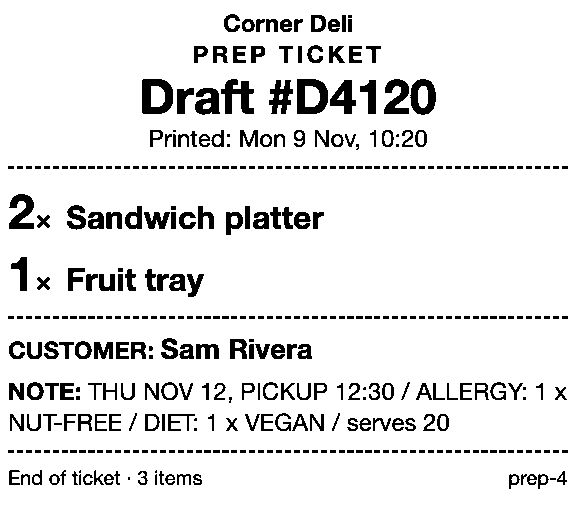
Prep Ticket prints a ticket from the draft in POS with item names, quantities, customer and notes, and no prices, so the cutting bench works from the weights written in the note. It prints through the iPad’s print dialog (AirPrint) to a printer the iPad can reach. If there’s no printer, staff are told so and offered the print dialog instead.
Once the draft holds the final price, load it to the cart and Pay Link makes a payment link from the POS cart. The customer pays the full amount on Shopify’s own secure checkout; staff never see or type card details.
Pay Link shows staff the total up front, with a note when checkout will add shipping; turn on local pickup so the customer can choose pickup at checkout. Tap twice by mistake and you still get one link, and staff can see whether it’s been paid.
Both apps need Shopify POS Pro.
Get early access to Prep Ticket and Pay Link
Prep Ticket and Pay Link, Countermade’s Shopify POS apps from Invenire Studios, aren’t on the Shopify App Store yet. Get early access and we’ll email you when they’re ready to try.
Pick one app or both
Thanks. You’re on the list, and we’ll email you when each app is ready to try.
Common questions
Can Shopify POS sell by weight without an app?
Can I connect a scale to Shopify POS?
Which sell-by-weight app works offline?
Can Shopify track stock in grams?
What’s the cheapest sell-by-weight app for Shopify POS?
Read next
About Pay Link- Comparison Shopify POS payment links: native options vs Pay Link Shopify’s payment link options at a POS counter, and where Pay Link fits.
- Comparison Pay Link vs Checkout Links vs Shopify Quick Sale Two POS apps and Shopify’s own Quick Sale, compared on price, POS fit and checks.
- Comparison Shopify POS vs Square for phone orders and payment links A phone order on Shopify POS and Square, step by step, with fees checked October 2026.
- Comparison Shopify POS Lite vs Pro for orders not paid at the counter Save, send to pay, print, pickup, delivery, staff credit: what each POS plan lets you do.
- Comparison Do I need a Shopify invoice app, or just a payment link? Send invoice emails a checkout link. Which Shopify tools make the PDF, and which take payment.
- Comparison Shopify Quick Sale vs Shopify POS: which should you use Quick Sale is a phone checkout; POS runs the counter. Which to use for each kind of sale.